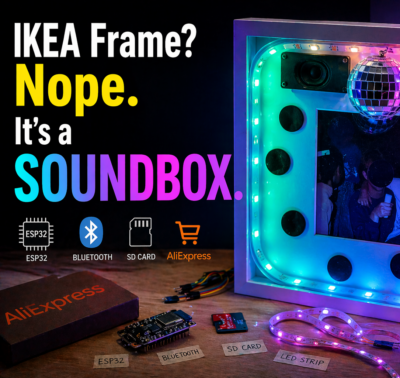
A friend of mine has a very particular taste in music. So when our group decided to give gifts that all fit into a common frame — literally — I had an idea. Why not build an actual sound machine inside an IKEA picture frame? Total budget: under €30, one weekend, and one AI coding assistant. Let’s go.
The Hardware
I didn’t have much time, so I just ordered everything from AliExpress in one shot:
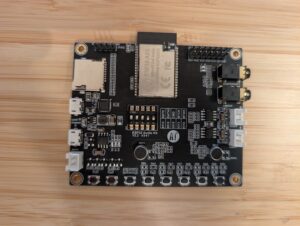
- Ai-Thinker ESP32-Audio-Kit (ESP32-A1S V2.2) — ESP32 with onboard ES8388 audio codec, two NS4150 class-D amplifiers, SD card slot, Bluetooth, six hardware buttons, all in one board. About €17.
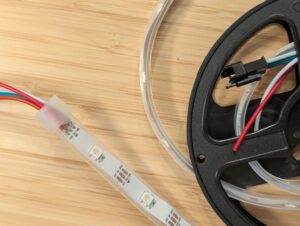
- WS2812B LED strip, 30 LEDs — individually addressable RGB, wired to GPIO22. Around €4.
- Two small speakers from my parts bin.
- A 5×7″ IKEA picture frame — €5.
- A USB power cable for 5V supply.
That’s it. No custom PCB, no breadboard rats’ nest. The board has two USB connectors — one for flashing, one for power — which makes things even cleaner.
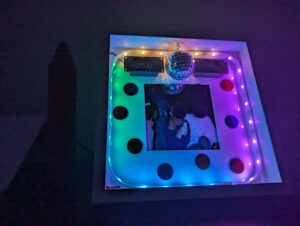
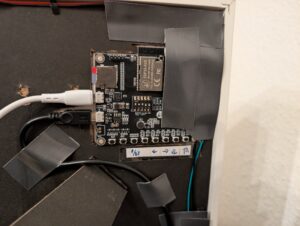
The speakers sit inside the frame glued to the plastic backing. If I were to rebuild this, I’d attach them directly to the wooden frame itself so it acts as a resonance body — the 6W amplifier is there, the 4Ω drivers are there, but right now the sound escapes through plastic. It still sounds surprisingly good for five-euro speakers. With the frame as resonator it would be genuinely excellent.
The Build
Everything fits together with double-sided tape and a hot glue gun. The only soldering needed is:
- Speaker wires to the board’s JST connector pads
- LED strip power + signal wire to the board
The board is recessed slightly into the back of the frame so nothing sticks out beyond the frame depth. You can hang this directly on a wall.
One small thing I’d add next time: an external power switch. Right now you unplug it. Works fine, but still.
What It Does
The feature set ended up being pretty complete:
- Plays all
.mp3files from the SD card root in alphabetical filename order, looping forever _welcome.mp3always plays first on boot (underscore sorts before letters) — the box greets you with a purple light frame- KEY1 short-press: pause/resume
- KEY1 long-press (2 s): toggle Bluetooth A2DP sink mode — LEDs pulse blue during pairing, then your phone streams audio through the same codec and the same LED show
- KEY3/KEY4: previous/next track
- KEY5/KEY6: volume down/up
- Bluetooth device name: Dietmars-Soundbox (personalized gift, obviously)
The LED Show
This is where it gets technically interesting. The LED task runs a 5-layer composited show on Core 0:
- Ambient — slow color breathing based on overall volume
- Beat burst — flash on kick detection
- Bass blob — low-frequency energy mapped to brightness
- Sparkles — random high-frequency glints
- Picture frame — the four sides of the frame each get a distinct hue, driven by volume tier
The audio pipeline works like this: PCM samples are tapped from the I2S write callback (both in SD and Bluetooth mode), converted from stereo int16 to mono float, and pushed into a stream buffer. The LED task drains that buffer, runs a 512-point FFT with a Hann window, splits the result into 8 logarithmic bands from 60 Hz to 20 kHz, applies per-band AGC with a ~10 s time constant, and does beat detection via a dual-EMA sub-bass ratio: kick_fast / kick_slow > 1.3, with a 200 ms minimum gap between beats.
At quiet passages the frame breathes in calm colors at low saturation. Loud and fast music triggers full-saturation disco snaps where each side of the frame gets a randomly assigned hue with ~80–120° forced separation — so you never get two sides the same color by accident. Volume tiers (quiet / mid / loud) control how many frame sides are lit at once.
It genuinely sets the mood of a room. That part was satisfying to see work.
Building It With Claude Code
I had a Docker container from a previous project — Ubuntu base, Node.js, @anthropic-ai/claude-code installed, USB serial device passthrough configured via docker-compose.yml. I dropped all the AliExpress datasheets and board schematics I could find into an external-docs/ folder, wrote a rough requirements.md, and let Claude loose.
The setup is worth describing: the repo has a CLAUDE.md that tells Claude to read requirements.md, all skills/ files (working conventions per concern), and all knowledge/ files (validated config notes per component) at the start of every session. This way Claude has context persistence across sessions without relying on conversation history. Each time Claude confirms a working configuration, it writes a note into knowledge/ — so the next session starts with what was already proven to work.
The first challenge was getting audio out at all. The ES8388 codec is sensitive to init order: SD card must mount before I2S init (GPIO25/26 conflict), MCLK must be stable for 100 ms before codec init, and you must use I2S_CLK_SRC_DEFAULT — APLL causes broadband white noise on ESP32. Claude worked through all of that by trying, failing, reading the error, and adjusting. The right path was to use espressif/esp_codec_dev and never write ES8388 registers directly.
There was also a nasty bug where every song with embedded cover art crackled at the start. The cause: the ID3v2 tag can contain a several-hundred-KB JPEG, and the Helix MP3 decoder was scanning through it byte-by-byte looking for a sync frame, starving the I2S DMA buffer. The fix was to parse the syncsafe size from the ID3v2 header and fseek() past the entire tag before handing the file to the decoder. Claude found this independently after I described the crackling symptom.
Bluetooth required a custom 3 MB partition table because the BT stack pushes the binary to ~1.1 MB. The A2DP data callback must be strictly non-blocking — push to a StreamBufferHandle_t, drain on a separate task on Core 1 — otherwise you drop the BT link under any load.
I’m a decent programmer. I would have needed two or three weekends to get all this working on my own. With Claude Code it was one.
Bill of Materials
| Part | Cost |
|---|---|
| ESP32-Audio-Kit (A1S V2.2, ES8388) | €17 |
| WS2812B LED strip (30 LEDs) | €4 |
| IKEA picture frame | €5 |
| Misc (USB cable, tape, glue) | ~€3 |
| Total | ~€29 |
Speakers from the parts bin, SD card from a drawer. Add another €5 if you’re buying those.
What’s Next
The natural upgrade is a small 5V LiPo under the frame for wireless wall-hanging. The LED strip needs 5V anyway, so no boost converter required — just a tiny LiPo with a TP4056 charger board under the frame. And a proper external power switch.
Full source and the devcontainer setup are on GitHub.
A few things I took away from this: cheap AliExpress hardware is genuinely capable if you understand what you’re buying. The ES8388 codec is a real audio chip — it sounds good. And Claude Code is a legitimately useful tool for embedded work, not just web stuff, as long as you give it structured context. The knowledge/ folder approach — where confirmed hardware facts accumulate across sessions — made a real difference. It’s worth setting up properly.