

I love taking photos, its a way for me to keep the memory fresh and to be thankful for the good times in live.
Since the very beginning I used Picasa to sort my photos. When Google stopped that service, I moved to Google Photos – since then I have hundreds of albums, that allow me to browse through my life.
I love all the features, from sharing, organizing, automatic synchronization and much more…. until I tried to download an album and checked for EXIF information on GPS and date and time…. and…. YES:
LOCKED IN THE CLOUD: As more I tried as more I got frustrated.. until I learned in a forum that this is not a defect, but strategy: You please keep your photos @ Google, so you are stuck with this service, pay money for cloud storage and ..just be with Google forever.
Yest – that can be fine, unless you start thinking what Google may do with Google Fotos, maybe “say goodbys”, limit the storage, share your data – you just don’t have control.
That was the reason why this happened:
Solution Overview
Source Code: https://github.com/happychriss/FreeYourPhotos
Problem: Dependency on Google and Cloud Services
- Long-term use of Picasa and Google Photos for storing and organizing pictures
- Risk of services closing down (e.g., Picasa)
- Additional costs for cloud storage
- Inability to retrieve all information from Google (e.g., geolocation)
- Google Photo API limitations (cannot access original data and geo-information)
Solution: Python Scripts and a Web App
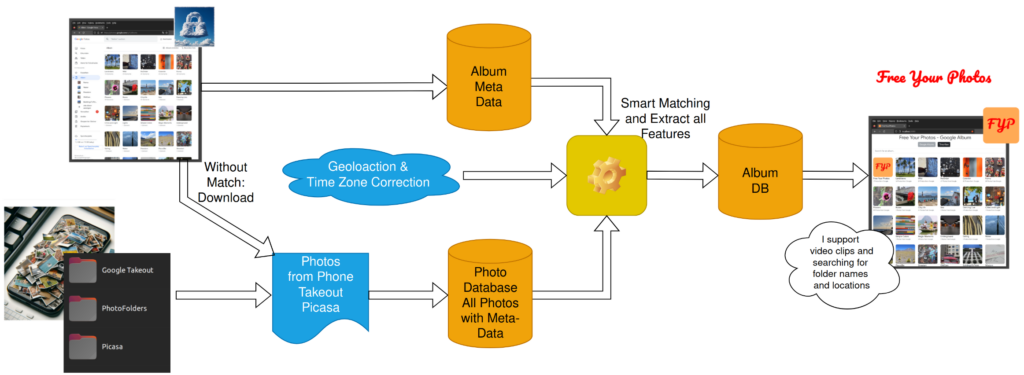
Python Scripts
- Download album structure and all photos from Google Photos
- Utilize original data stored on mobile phones, PC folders, or extracted from Google Takeout
- Retrieve all geo and date information for better ownership of data
- Integrate photos from your own folder and archives for a consistent look
Web App
- Similar functionality to Google Photos,
- Shows Photos and Videos
- Photos with Location & Map
- Search by place and title
- One tool for all sources, includes Takeout, Picasa (with favorites) and Folders – displaying in Timeline Mode -in right order
Benefits
- Independence from Google and cloud services
- Avoid additional costs for cloud storage
- Ownership and control over your data
- Combine multiple photo sources for a consistent experience
Software Stack & Dependencies
- Python
- Flask (Webserver)
- PostgreSQL
- Docker
- Google APIs:
- Cloud API to connect to Google Photos (API Key needed) ,
- Geolocation API to convert geocordinates to location information (search by location)
- Time API to convert Location to Timezone, to correct time zone (that Google took away)
- Google MAPs to display location on Photo Detail Page
Next Steps
You like it, you want to help. Contact me, via Github or LinkedIn, see About Me
Latest News
[display-posts category=”free-your-photos” include_content=”true” image_size=”thumbnail” include_date=”true” date_format=”(d.m.Y)”]