
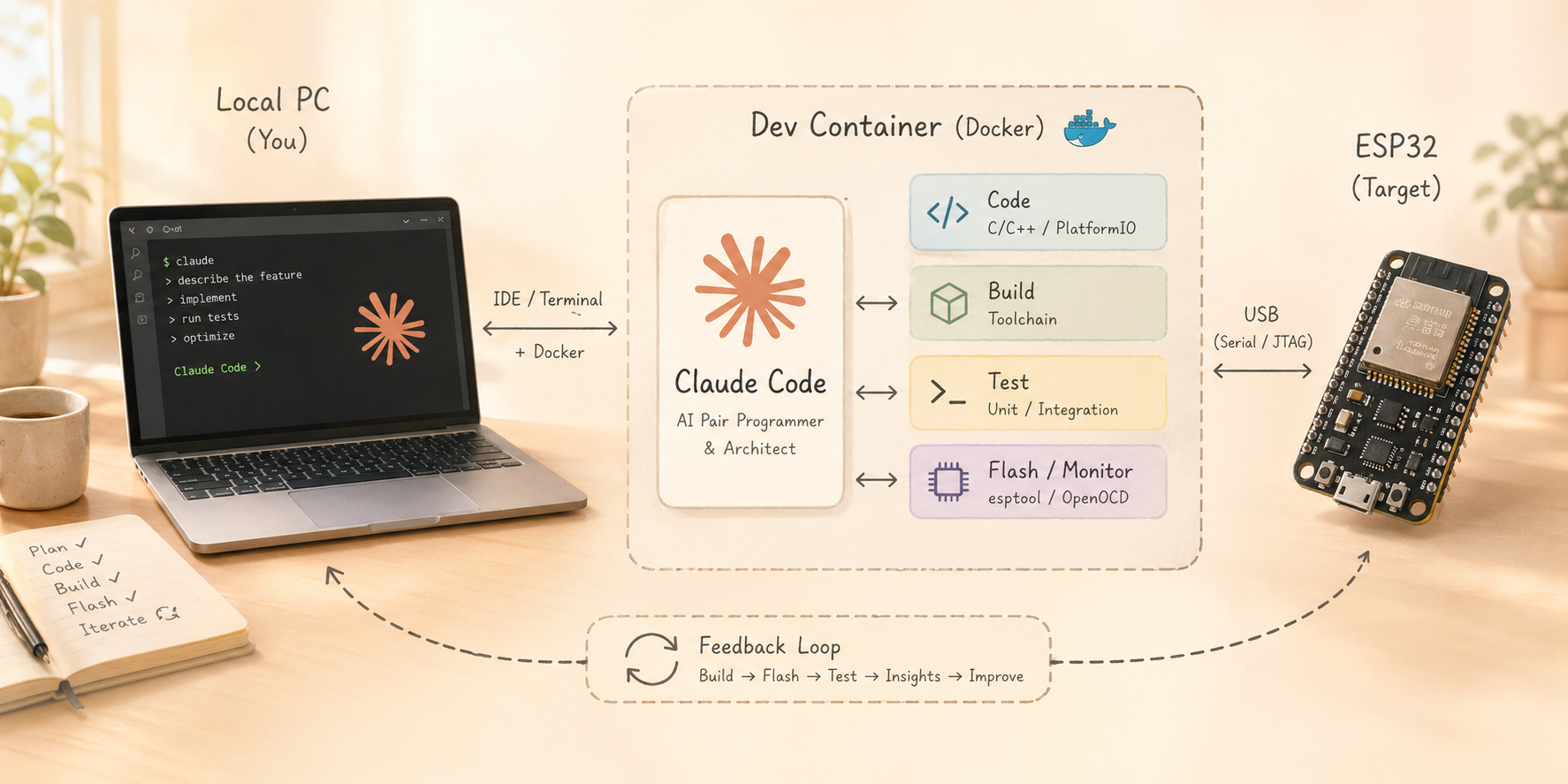
Something shifted in how I program. Not just in the tools I use — but in how I think about the work itself.
It’s Not Really an Agent. But It Feels Like One.
I recently wrote about why context is the missing layer in AI-driven work — the idea that the sequence is Data → Analytics → Context → Action, and that without context, even smart systems stay limited. You can read that post here.
Claude Code is a good example of this in practice. It’s not a true autonomous agent. It doesn’t plan multi-step strategies on its own. It doesn’t have memory across sessions by default. But when you give it the right context — the codebase, the requirements, the error logs, the hardware specs — something interesting happens. It starts to act rather than just answer. It writes, runs, reads the output, adjusts, and iterates. That feedback loop — code, execute, observe, fix — is what makes it feel agentic, even though technically it isn’t.
The intelligence was always there in the model. What unlocks it is context. And building the right container for that context — literally and figuratively — is what this post is about.
The Old Way Was Frustrating
I started experimenting with Claude Code early on. The concept is great: give an AI a task, let it write code, run it, see what breaks, fix it, repeat. Fully autonomous.
But the default experience was painful. Constant confirmation prompts. “Should I proceed?” — yes. “Are you sure?” — yes, just do it. That kills any sense of flow.
Then I heard about --dangerouslySkipPermissions. That removes all the guardrails. Claude just executes. Which sounds great — until you realize you’re running an autonomous AI agent with full access to your actual PC. Your home directory. Your SSH keys. Everything.
I also tried running Claude on an isolated machine — an old Raspberry Pi — which worked but was awkward and had no real development environment. Not a long-term solution.
A Swiss Guy on YouTube Had the Right Idea
I stumbled across this video. Andreas Spiess — strange accent, great ideas — who simply installed Claude Code inside a virtual machine and ran it with full permissions there. Clean isolation. No risk to the host.
The direction was right. But a full VM is heavy. I wanted something lighter, faster to spin up, and more developer-friendly.
After a bit of research I found VS Code Dev Containers — and they turned out to be a perfect fit.
What Is a Dev Container?
A Dev Container is just a Docker container — but with a special .devcontainer/ configuration folder in your project. When you open the project in VS Code, it detects this config and asks: “Reopen in Container?”
You click yes. VS Code reopens. Same editor. Same extensions. Same terminal. But now everything runs inside Docker. The container is isolated from your host. Your actual filesystem, your home directory, your other projects — invisible and unreachable from inside.
You don’t even notice you’re in a container. That’s the point.
This is exactly the sandbox Claude Code needs to run with full permissions safely.
The Template I Built
I created a reusable template on GitHub — a ready-to-use Dev Container setup for Claude Code with a clear security model and a practical project structure.
Security model — what’s protected:
- Host filesystem: only the
./projectfolder is mounted — nothing else on your PC is visible inside the container - No
privilegedmode: the container cannot escape to the host kernel - SSH keys: never copied in — the host SSH agent socket is forwarded, keys stay on your machine
- GitHub token: passed as env var, never stored in the container
- USB access: hot-plug support for ESP32 and Arduino via
device_cgroup_rules— no full/devaccess needed
There is also an optional outbound firewall that restricts Claude to allowlisted domains only (Anthropic API, GitHub, npm, VS Code). I usually leave it off and just watch what Claude does — but it’s there if you want it.
The Project Structure — Context Is Everything
The container gives Claude a clean, isolated workspace. But the real insight is what’s inside the project/ folder. This is where context lives — and context is what makes Claude Code go from impressive demo to actual tool.
project/
  CLAUDE.md          ← session bootstrap: tells Claude what to read at startup
  requirements.md    ← what you're building — written by you, for Claude
  memory.md          ← live session memory — Claude writes here
  skills/            ← working conventions, loaded every session
  knowledge/         ← confirmed config and integration notes
  external-docs/     ← raw reference material (API docs, specs)
  src/               ← the actual source code
Every session, Claude reads CLAUDE.md first. That file tells it to load requirements.md, all skill files, and all knowledge files before doing anything else. Claude knows the full project context before writing a single line of code.
requirements.md is the key file — and writing it is now your main job. You don’t write code anymore. You write what you want. You describe the feature. You think through the architecture. You define constraints. You specify the behavior. Claude reads it and implements it.
This is the shift I mentioned at the start. You move from coder to architect. The work changes — it’s not about syntax anymore, it’s about clarity of thought. If you can describe what you want precisely, Claude can build it. If your requirements are vague, the output will be vague. Good thinking produces good code.
Skills are reusable context. A skill file can define how to structure code for a specific hardware board, which GPIO pins are available, what libraries to use, what pitfalls to avoid. You write the skill once — and swap it in for every project that uses that board. Claude immediately works more efficiently because it already knows the environment before you start.
Knowledge files accumulate truth. When Claude figures out a tricky integration — a working config for a library, a confirmed pin mapping, a tested setup — it writes it into knowledge/. Next session, it starts with that already loaded. No re-discovery.
Starting a New Project: Three Steps
The template is designed to be copied per project. Starting fresh is fast:
- Copy the template folder, rename it to your project name
- Edit
.env: setCOMPOSE_PROJECT_NAMEto something unique - Open the folder in VS Code → “Reopen in Container” → enter API key → start Claude with
--dangerouslySkipPermissions
Each project gets its own isolated container, its own Claude config volume, its own shell history. No cross-contamination between projects.
The ESP32 Feedback Loop — Hardware Gets Interesting
The USB passthrough is what makes hardware projects genuinely exciting.
Claude Code doesn’t just write firmware — it flashes it to the ESP32 via USB, reads the serial debug log, and reacts to errors automatically. The loop looks like this:
Write code → flash → read serial output → fix error → flash again.
All without me touching anything. Claude drives the entire cycle.
I was building a touch display project. Claude couldn’t see the screen, obviously. So it just asked me: “I can’t see the display. Does it look correct? Just say yes or no.” Otherwise it was perfectly happy reading the debug port and iterating on its own.
That feedback loop is the concrete, hardware version of the same principle from my other post. The model is smart. But what makes it act is context: the code, the error log, the serial output, the confirmed hardware config in knowledge/. Remove any of that and the loop breaks.
Real Projects Done This Way
This isn’t theoretical. I’ve used this setup to build several actual projects:
- Soundbox — hardware audio project with ESP32: Claude wrote the firmware, flashed it via USB, read the serial log, debugged autonomously
- PyLearn — a Python learning app, posted here on 44-2.de — built in a few evenings
- A Firefox extension that expands the Perplexity chat sidebar to full screen width — one evening, done
Projects that would have taken me weeks now take two or three evenings. And the code quality? Honestly, at least as good as mine. Often better structured. Sometimes better documented than I would have bothered to do.
Watch Out
A few real risks to know about:
- API costs: Claude calls the Anthropic API freely from inside the container. Set a spend limit at console.anthropic.com — seriously, do it before you start.
- Git push risk: Claude has access to your forwarded SSH key and can push or delete remote branches. Protect your important branches on GitHub, or set
ENABLE_GIT=falsein.env. - USB security: The
/devfilesystem is bind-mounted for USB support. OnlyttyACMandttyUSBdevice classes are accessible via cgroup rules — but understand what you’re enabling. - Firewall bypass: If you enable
NET_ADMINfor the optional firewall, Claude could theoretically flush its own iptables rules. Acceptable if you trust the model. Remove the capability if you don’t.
Container isolation is very good. It is not magic. Know the tradeoffs.
What’s Next
A few things I want to explore:
- More skill files for different hardware boards — ESP32-S3, RP2040, different Arduino variants — each with pinouts, known-good libraries, and gotchas already loaded
- Better firewall profiles: project-specific allowlists rather than one global list
The deeper idea here is that skill files could become a community resource. Share the skill for your board, your framework, your setup — and everyone’s Claude sessions get smarter about that environment immediately.
The template is on GitHub: happychriss/claude-code-container
Copy it. Edit requirements.md , change the .env file with your project name, and if needed update your USB device. Describe what you want to build (and if you like – which platform or language). Watch what happens.