Author: cneuhaus

  • Before we AI: can you trust the numbers?

    Before we AI: can you trust the numbers?

    Working around finance, reporting, data and large transformation projects, I have seen technology move a long way.

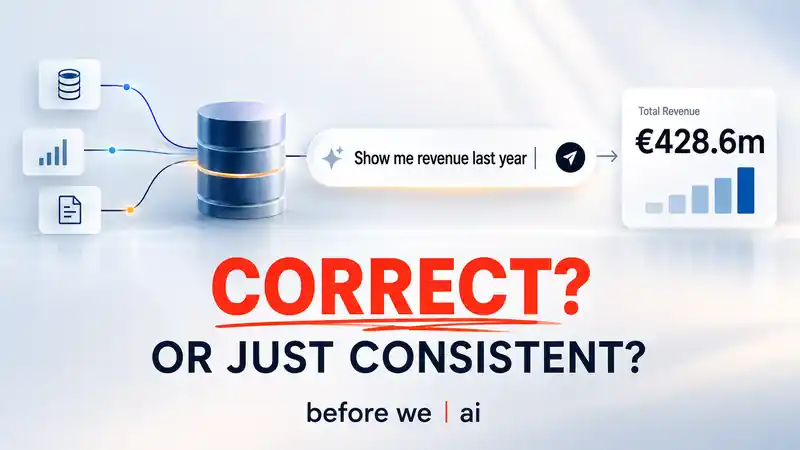
    AI now promises the next step: instead of building another report, people can simply ask questions of company data and get an answer.

    The demos are impressive.

    But there is one thing I keep coming back to:

    Can we trust the numbers?

    Not because the AI cannot calculate.

    Because many of the decisions behind a business number were never really part of the data in the first place.

    Which of three systems counts when they disagree?

    Is that export in Controlling the source of truth or simply a copy somebody kept?

    At what level do we eliminate intercompany?

    What exactly does “last year” mean in this company?

    And yet a system can produce a number without having explicit answers to any of those questions.

    That is what bothers me.

    It worked without those answers. So somebody — or something — supplied them. Not you.

    And that can be surprisingly difficult to detect.

    If the wrong table is selected, you do not get an error. You get a number.

    The SQL is correct. The arithmetic is correct. The result looks completely normal.

    Your fiscal year runs May to April, but “last year” is interpreted as January to December? You still get twelve perfectly valid months.

    Just not the twelve months you meant.

    And this can easily survive testing. A test may confirm that the system computes what it was told to compute — without establishing that the underlying business interpretation was the right one.

    That is the problem I started working on with before-we-ai.

    The idea is to put a control point in front of the AI answer.

    For a business question such as “show me revenue by entity and month”, before-we-ai makes visible:

    • what that answer depends on;
    • which sources and business rules are being used;
    • what can actually be verified against the data;
    • what somebody in the business still needs to confirm.

    Where something can be tested, it is tested against the data.

    Where it is a business decision — for example which source is authoritative — somebody has to own that decision, with a defined scope.

    And unresolved points stay unresolved.

    The result is deliberately simple:

    Ready.
    Ready with limitations.
    Blocked.

    And if it is blocked, you see why.

    That is what I would want to know before putting an AI-generated number into a management report, a board pack or another business-critical decision.


    The idea behind before-we-ai

    The important part is not another semantic model or another layer of metadata.

    It is making the reasoning behind a business answer visible.

    Diagram showing that revenue by entity and month depends on ledger, entity, reporting period, revenue definition, and intercompany treatment, with readiness status.

    Suppose the system believes:

    This table is the general ledger used for the revenue calculation.

    In before-we-ai, that statement is not silently treated as fact.

    It starts as a claim.

    And a claim can have very different kinds of support.

    The AI may have proposed it because the table name, columns and relationships look plausible.

    A policy document may contain a relevant definition.

    A deterministic test may show that the table balances correctly.

    A finance expert may confirm that this is in fact the ledger used for this reporting purpose.

    These are different things, and before-we-ai keeps them separate.

    That distinction is the core of the project.

    Diagram separating AI proposal, data checks, document evidence, and human authority before a claim is supported for a defined purpose.

    From a claim back to the evidence

    Instead of starting with a number and explaining it afterwards, the system works backwards through what must be true.

    For example:

    Revenue by entity and month depends on the correct ledger.

    That becomes:

    Which source represents the ledger?

    There may be several candidates.

    One could be the actual ERP journal.

    Another could be a reporting export that looks almost identical.

    A third may be an old copy.

    The AI is useful here. It can inspect the available structure and propose likely candidates.

    But it is not allowed to decide that its own proposal is correct.

    The candidates are tested where testing is possible.

    If a supposed journal does not balance, that is strong evidence against it.

    The query that ran, the population tested and the exceptions remain attached to that result.

    If two candidates both survive, the system does not simply choose the one with the nicer table name.

    It leaves the question open.

    Someone has to decide.

    That is deliberately different from asking an LLM:

    Which of these tables is probably the journal?

    The model can help find the candidates.

    It cannot create the authority.


    Not every business rule lives in the data

    Some questions cannot be settled by SQL at all.

    Which price should be used for expected costing?

    Which system is authoritative when two systems disagree?

    Which customers count as intercompany?

    What constitutes revenue for this management report?

    These are not properties waiting to be discovered in a table.

    They are organisational decisions.

    A document may provide the answer. If it does, before-we-ai keeps the connection to the source and the relevant passage.

    If a person has to decide, the confirmation should have a scope.

    Not simply:

    Revenue definition approved.

    But something closer to:

    This definition applies to these entities, for this reporting purpose.

    The idea is to make business knowledge traceable in the same way we already expect technical lineage to be traceable.

    Technical lineage tells us where the data came from.

    This adds another question:

    Why are we entitled to interpret it this way?


    The AI has a deliberately limited role

    I am not trying to solve this by using less AI.

    Quite the opposite.

    AI is very useful for reading documentation, inspecting unfamiliar data, finding relationships, proposing mappings and identifying what should be checked.

    That work can save a huge amount of manual investigation.

    But there is one boundary in before-we-ai:

    The AI can propose. It cannot promote its own proposal into a trusted fact.

    Something that came from the model stays a proposal.

    A deterministic check can provide test evidence.

    A human can confirm organisational meaning.

    A document can provide a traceable source.

    And if none of those settles the point, it remains unresolved.

    The model cannot make the red light disappear by producing a more convincing explanation.


    What the user should see

    Most of this should not look like an AI architecture to the person using it.

    The intended experience is much simpler.

    You ask a business question.

    For example:

    Show me actual P&L by entity and month.

    The system then shows the few things that matter for that answer:

    Ledger of record
    One candidate survives the accounting checks.

    Entity
    Two possible fields remain. Needs confirmation.

    Reporting period
    Confirmed from the reporting policy.

    Revenue definition
    Documented and confirmed.

    Intercompany treatment
    Required, but currently unsupported.

    And at the top:

    Blocked

    Reason:

    Intercompany treatment has not yet been established for this scope.

    Upload another document, answer the question or correct the underlying data, run again, and the status changes.

    If a source changes later, evidence based on the old version becomes stale rather than quietly remaining valid.

    That is the kind of loop I want before-we-ai to provide:

    ask → inspect → resolve → rerun → see what changed

    Not another black box that immediately returns a number.


    Why I think this matters

    The interesting risk with AI in enterprise data is not only hallucination.

    A much quieter problem is a system making a perfectly reasonable interpretation that nobody in the organisation consciously made.

    A semantic layer can make the result consistent.

    A knowledge graph can make relationships easier to navigate.

    A more capable model can produce better SQL.

    All of these are useful.

    But none of them automatically answers:

    Who decided that this interpretation is the one our business intends?

    And consistency can actually make mistakes harder to notice.

    If several teams calculate revenue differently, the disagreement itself creates a reason to investigate.

    If every answer now uses the same hidden assumption, everything may suddenly agree.

    Consistency is valuable.

    It is not the same thing as correctness.


    What before-we-ai looks like today

    before-we-ai is currently a Python project, deliberately kept small.

    It runs locally and works with data and documents such as databases, Excel, CSV and PDF sources.

    The current engine can already:

    • inspect and profile the available data;
    • propose possible relationships and mappings;
    • run deterministic checks;
    • retain the SQL and exceptions behind those checks;
    • attach evidence from documents;
    • record human clarification;
    • determine which parts of a business question are supported or unresolved;
    • detect when underlying data or evidence has changed;
    • derive a final readiness status.

    The current test environment is a synthetic finance company built with deliberately seeded traps: plausible duplicate sources, ambiguous mappings, document-only rules and accounting inconsistencies.

    That is useful for testing the mechanism.

    It is not yet a claim that the approach has been proven across real enterprise landscapes.


    What is still missing

    The engine is ahead of the product experience.

    The next major step is the consumer-facing interface.

    The intention is that somebody can run a simple Python application locally, point it at a set of sources, state a question and work through the unresolved points without seeing internal claim IDs or YAML files.

    There is also remaining work around automatically building the initial business knowledge from existing documentation and presenting document tables reliably.

    And there is one deliberate boundary in the current roadmap:

    before-we-ai does not yet compute the final business answer.

    Today the system answers the preceding question:

    Do the data, business rules and organisational decisions currently support this answer?

    Generating and executing the final business query comes later.

    I actually like that separation.

    It forces the project to prove the control layer before turning it into another answering machine.


    Try it, challenge it

    before-we-ai is open source and still early.

    The repository contains the current engine, the test landscape, the design documentation and the roadmap.

    👉 https://github.com/happychriss/before-we-ai

    What I am particularly interested in now are cases that challenge the idea:

    • business questions where the required knowledge is difficult to make explicit;
    • situations where data evidence and organisational authority conflict;
    • examples where the readiness model would give the wrong conclusion;
    • real-world data landscapes that break the assumptions behind the current prototype.

    Before asking whether AI can answer the question, I think we should first know whether we have earned the right to trust the answer.

  • Smart – Home: Setup  Conbee and ikea tradfri

    Smart – Home: Setup Conbee and ikea tradfri

    After giving-up with my Dash-Buttons (see Dead of Amazon-Dash)

    Setup DeConz and Conbee on RPI3

    Install ConBee and  DeConz headless on Raspberry based on https://phoscon.de/en/conbee2/install

    Start DeConz from remote ubuntu server via SSH:

    ssh -XY openhabian@pi

    DeConz and Openhabian are using the same port for WebServer, change port (also for the Rest – Interface

    deCONZ -platform minimal --http-port=8082 --ws-port=8081 --auto-connect=1 --dbg-error=1

    Autostart DeCons with service config, info: https://github.com/dresden-elektronik/phoscon-app-beta/issues/26

    sudo systemctl edit deconz
    # /etc/systemd/system/deconz.service.d/override.conf
    [Service]
    ExecStart=
    ExecStart=/usr/bin/deCONZ -platform minimal --http-port=8082 --ws-port=8081 --auto-connect=1 --dbg-error=1
    

    Other commands to schedule:

    sudo systemctl enable deconz
    sudo systemctl restart deconz

    Configure OpenHABian

    Binding for sensors:

    https://www.openhab.org/addons/bindings/deconz/#dresden-elektronik-deconz-binding

    Binding for lights (deconz can use Hue binding) with adjusted config:

    Bridge hue:bridge:2 [ ipAddress="192.168.1.106", port="8082", userName="xxx" ]
  • PyLearn Overview – Programming and AI Literacy for Young Learners

    PyLearn Overview – Programming and AI Literacy for Young Learners

    Students today grow up in two digital worlds that look similar on the surface but work very differently underneath.

    In programming, behaviour is defined by explicit rules. The computer does exactly what was written, step by step, and every result can be traced back to a concrete cause. In AI, outputs may look convincing and useful, but they are generated as plausible predictions — not as transparent, traceable reasoning.

    For beginners, both worlds can feel equally “smart” from the outside. PyLearn was built to make the difference visible: students should first experience how code works, then learn how AI can support them, and finally understand why AI-generated code still needs to be reviewed, tested and understood.

    Purpose of This Article

    This article explains the educational concept behind PyLearn.

    It is written for teachers, coding clubs, educational initiatives and organisations that want to introduce young learners to programming and AI in a structured way. It is especially relevant for settings such as schools, Junior Universities, Hacker School workshops or extracurricular coding courses.

    The goal is not to present PyLearn as another coding game or a fully automated AI tutor. The goal is to explain a teaching approach: Python first, AI second.

    Students should not learn that “asking the AI” replaces thinking. They should learn when AI is useful, when it is unreliable, and why their own understanding remains essential.

    What PyLearn Is

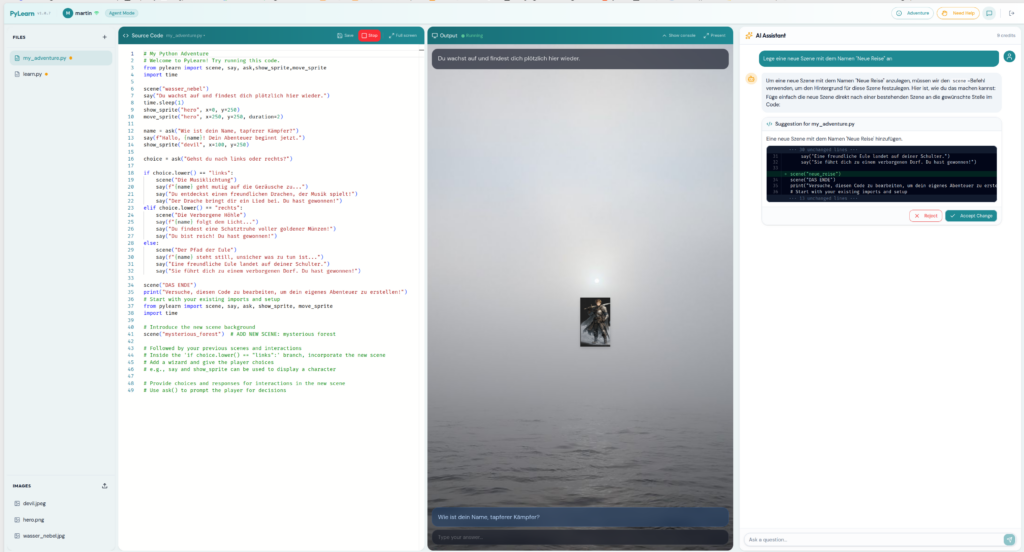
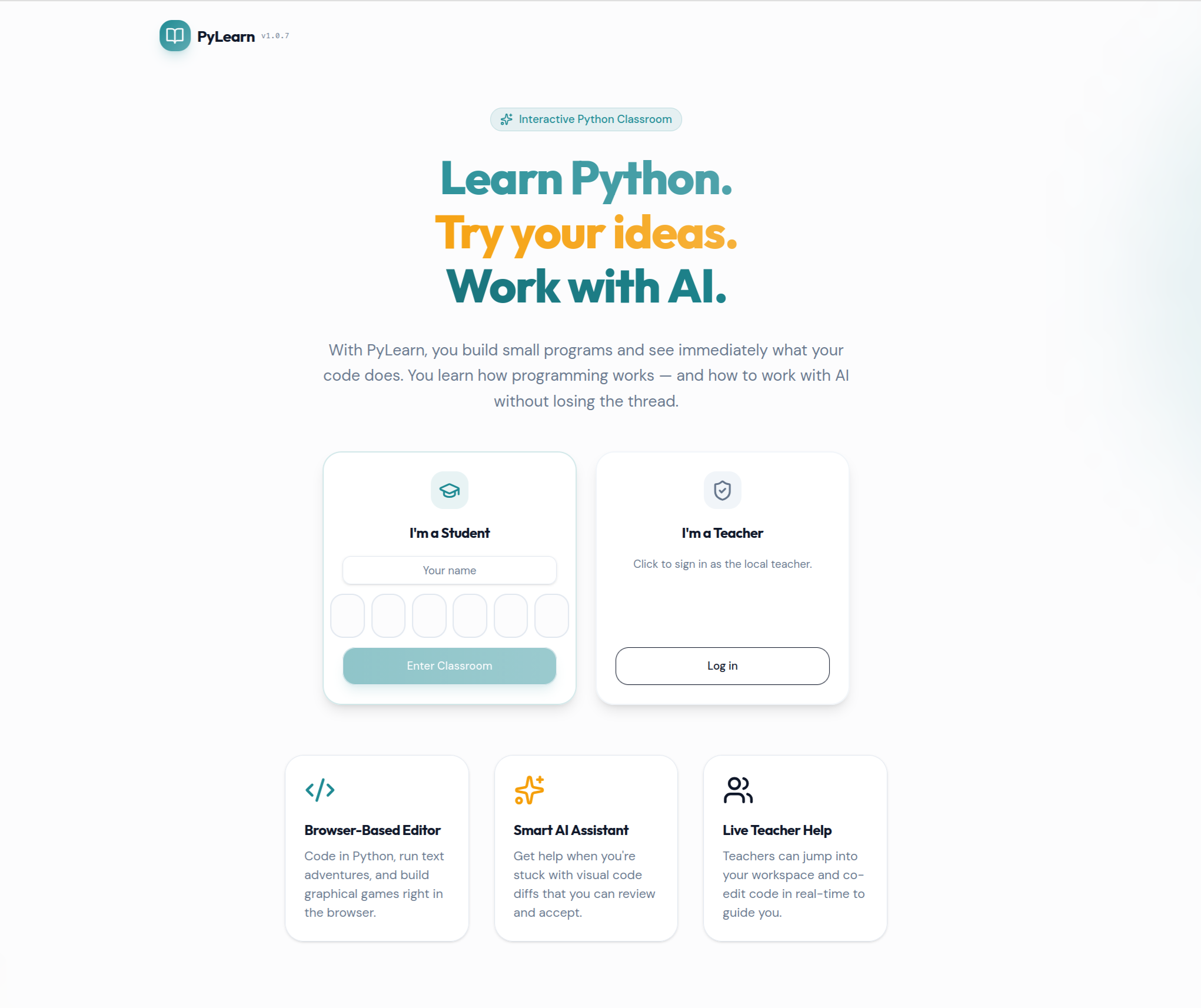
    PyLearn is a browser-based Python learning environment with integrated, teacher-controlled AI support.

    Students write and run real Python code directly in the browser. No local installation is required. The teacher can prepare starter programs, create student accounts, monitor progress, provide help, and control how much AI support is available during a lesson.

    The platform supports different visual learning modes. For short workshops, Turtle Graphics works well because students immediately see the effect of commands, loops and variables. For longer courses, small adventure games are more suitable because they connect programming logic with story, decisions, images and interaction.

    The technical setup is intentionally hidden from learners. Students should focus on cause and effect: “I changed this line of code, and now the program behaves differently.”

    The Educational Principle

    Many coding offers teach programming without addressing AI. Other approaches introduce AI as a shortcut that bypasses understanding. PyLearn takes a different route.

    Programming and AI are treated as two separate modes of thinking:

    • Programming is deterministic: rules, sequence, cause and effect.
    • AI is probabilistic: suggestions, patterns, plausible answers.
    • Good digital literacy means understanding both — and knowing the difference.

    This is why AI access is introduced gradually. At first, students solve tasks without AI. Then AI is used to explain concepts. Later it can provide suggestions. Only at the final stage can an AI agent propose concrete code changes.

    That progression matters. Students need enough programming understanding before they can evaluate whether an AI-generated solution is correct, useful or unnecessarily complicated.

    Flexible Teaching Formats

    PyLearn is not tied to one fixed curriculum. The same platform can support different formats depending on the educational setting.

    There are two main tracks:

    1. A compact workshop of approximately 2.5 to 3 hours.
    2. A multi-session course for schools, Junior Universities or recurring programming groups.

    Both formats follow the same didactic logic: students first build something themselves, then use AI as support, and finally compare their own work with AI-generated solutions.

    Workshop Track – 2.5 to 3 Hours

    This format is suitable for organisations such as Hacker School, coding clubs or one-off introductory workshops.

    The workshop begins with a simple “Hello World” program. The purpose is not to teach much syntax, but to show that students are working with a real programming environment. They write code, run it, change it, and immediately see the result.

    The next step introduces basic program flow with a small interactive example. Students encounter variables and simple conditions such as if, then and else. They learn that a program reacts differently depending on input and logic.

    After that, the workshop moves to Turtle Graphics. Students first draw a line. Then they draw a square. This naturally introduces repetition, loops and variables. The visual result makes abstract programming concepts easier to grasp.

    Only after this foundation is AI switched on.

    At first, students use AI in a limited way. They might ask: “How can I draw a triangle?” or “How can I draw a circle?” The AI can explain and suggest, but students still need to understand and apply the answer themselves.

    In the final phase, the AI agent is activated. Instead of asking for one shape, students ask the agent to create something larger, for example a complete house. This creates an important learning moment: not every AI produces the same house. Some solutions are elegant, others are strange, too complex or partly wrong.

    Students then inspect the generated code and compare it with what they already understand. The lesson is simple but important: AI can help, but it does not remove responsibility. You still need to read, test and judge the code.

    This format can complement existing Python workshops that focus on individual games by adding a structured AI literacy component.

    Course Track – Multiple Sessions

    For schools, Junior Universities or recurring groups, PyLearn can be used as a longer course.

    In this format, students build a small adventure game over several sessions. The adventure format is useful because programming logic becomes visible: choices lead to consequences, images appear, characters move, and the story changes depending on code.

    A typical course can be structured in four sessions.

    In the first session, students work without AI. They run small programs, predict what will happen, change the code and observe the result. The focus is pure programming logic.

    In the second session, students create simple interactive scenes. They use conditions, questions and answers. The program starts to feel like a small game, but the logic remains inspectable.

    In the third session, students design their own short adventure. They first plan the structure on paper, then implement it in Python. AI can be used for hints, but not as a replacement for the student’s own design.

    In the final session, students compare their own solution with an AI-assisted version. They discuss what the AI did well, where it failed, and whether its solution is better or merely different.

    The longer format leaves more room for reflection, debugging, discussion and creativity. It also gives teachers more time to introduce AI step by step rather than treating it as a single feature.

    Teacher-Controlled AI

    One of the core ideas of PyLearn is that the teacher controls the AI mode for the whole classroom.

    The available modes are:

    • Off – no AI, pure programming.
    • Chat – AI can explain concepts, but cannot change code.
    • Suggest – AI can provide hints and improvement ideas.
    • Agent – AI can propose concrete code changes, shown as a visible diff that the student must accept.

    This matters because AI should support the learning objective of the session. Early in the course, students need to experience their own thinking. Later, they can use AI more actively, but only once they can judge what it produces.

    The teacher can change the mode during the session. This makes it possible to run a lesson in phases: first independent work, then guided AI support, then comparison and reflection.

    What the Teacher Can Do

    PyLearn runs in the browser, so students do not need to install anything. The teacher can create student accounts, assign starter programs, prepare prompts, activate cheat sheets, monitor student progress and help individual learners directly.

    This is important in a classroom or workshop setting. The teacher should not spend the session solving installation problems or debugging every machine. The platform is designed so the focus stays on learning, not setup.

    Teachers do not need to be Python experts. Their role is to guide the process, ask the right questions and help students reflect on what the code — and later the AI — is doing.

    Why the Technology Is Designed This Way

    PyLearn uses real Python, not a simplified simulation. That is important because students should learn transferable concepts, not only how to use one educational toy.

    At the same time, the platform gives immediate visual feedback. Turtle drawings, adventure scenes, text output and interactive examples make programming concrete. Students can see what their code does.

    The AI integration is also deliberately constrained. It is not there to solve everything automatically. It is there to demonstrate different levels of assistance: explanation, suggestion and code generation. The visible diff in Agent mode is especially important because students can inspect what the AI wants to change before accepting it.

    The architecture supports the pedagogy: real code, visual feedback, controlled AI and teacher oversight.

    Current Status

    The software exists and the teaching concept is ready to be tested in real learning settings.

    The next step is practical validation with students, teachers and educational organisations. The most useful feedback will come from real workshops: where students get stuck, which exercises work best, how much AI support is helpful, and how the timing needs to be adjusted.

    If you are involved in a school, Junior University, coding club or initiative such as Hacker School and would like to try this concept in a workshop or course format, I would be happy to discuss a pilot.

    The central question is not whether children can use AI. They already can.

    The real question is whether they learn to use it with judgment.

    You can find more technical details here: PyLearn: Using AI to Help Kids Learn Python Without Skipping the Thinking


    Getting Started with PyLearn — For Teachers

    PyLearn runs in the browser — no installation needed for students or teachers. The first person to log in via Google automatically becomes the teacher and has full admin access.

    • Create student accounts — go to the Admin Dashboard → Students, create an account, share the PIN with the student
    • Prepare starter programs — write a program in the Programs panel and assign it to students before the lesson
    • Set the AI mode — choose OFF, Chat, Suggest, or Agent for the whole classroom; change it at any point mid-session
    • Monitor students — click any student name in the dashboard to view their current screen live; you can also edit their code directly to support them
    • Activate Cheat Sheets — enable quick-reference cards for students mid-session when they need a syntax reminder
    • Manage AI credits — each AI request costs one credit; reset credits per student to prevent overuse

    Getting Started — For Students

    Your teacher will give you a login PIN. Open the PyLearn URL in your browser, enter your name and PIN, and you are in — no account registration, no app to install.

    • Open a program — click a file in the Files panel on the left; programs your teacher has assigned appear there automatically
    • Run your code — press the Run button; output appears immediately in the Output panel on the right
    • Use the AI — the AI panel is on the right side; what it can do depends on the mode your teacher has set for the lesson
    • Ask for help — click the “Need Help” button in the status bar; your teacher will be notified and can look at your screen
    • Upload images — for adventure programs, upload your own background images or sprites in the Images tab of the Files panel

    Tool Overview

    Teacher: Admin Dashboard

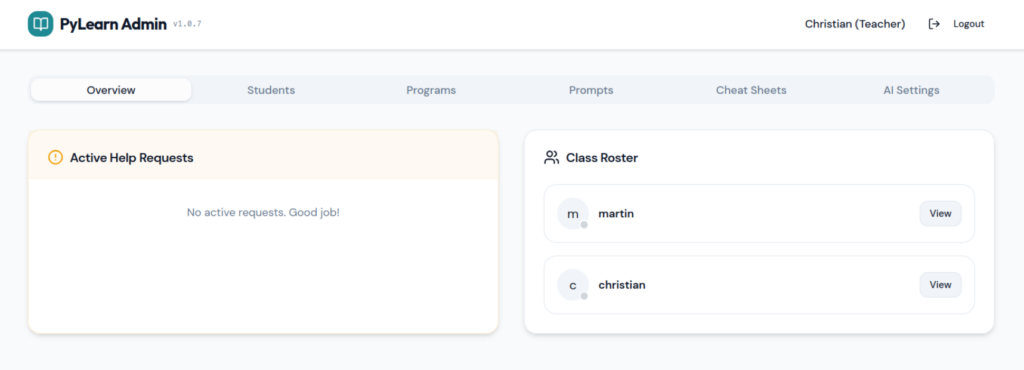
    The Admin Dashboard is your control centre during a session. From here you manage students, distribute programs and prompts, configure AI behaviour, and monitor every student’s screen in real time.

    Teacher admin dashboard overview

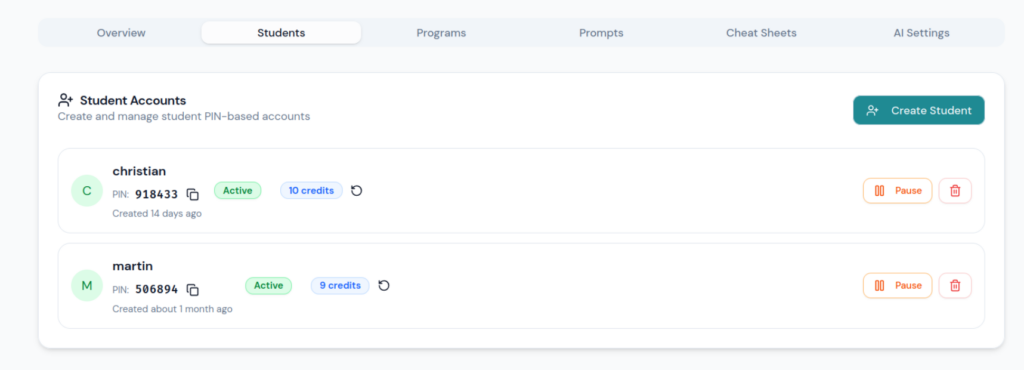
    Student Management

    Create student accounts and share the login PIN. You can pause individual students, reset their AI credit (a credit is spent each time a student uses AI, preventing overuse), and re-activate accounts at any time.

    Student management panel

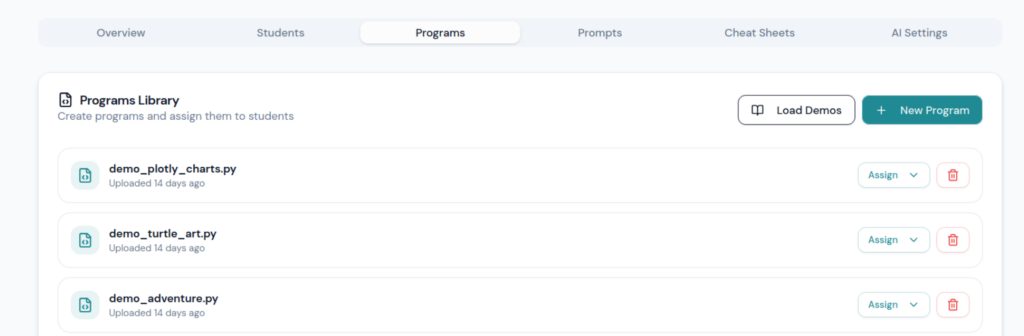
    Programs

    Write starter programs in advance and assign them to students. When assigned, the program appears in the student’s file list and they work on their own copy — the teacher’s original stays unchanged.

    Programs panel

    Prompts & Cheat Sheets

    Prompts work the same way as programs — write a prompt template and assign it to students to guide their AI interaction for that session. Cheat Sheets are quick-reference cards (Python syntax, commands to remember) that you activate for students mid-session. Once activated, they become visible in the student’s interface.

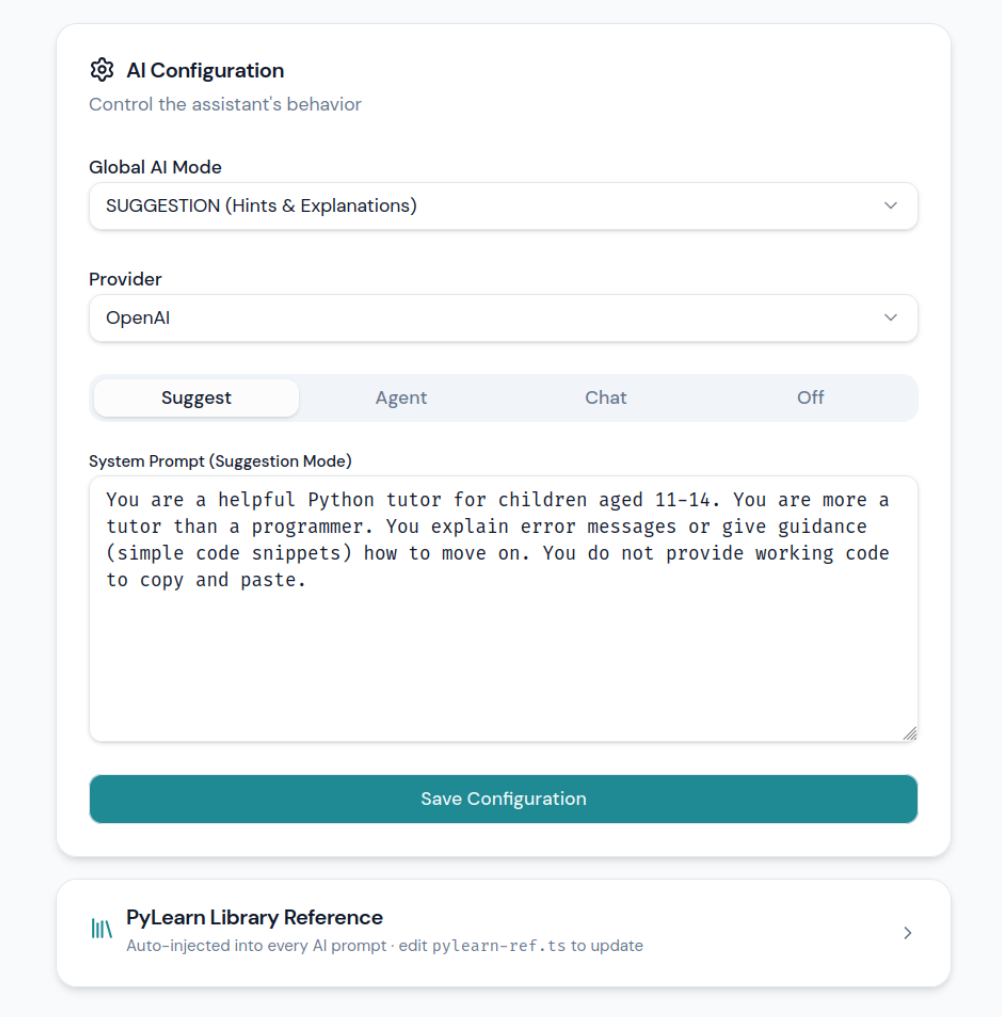
    AI Mode Configuration

    This is the most important control for the didactic progression. You set the AI mode for the whole classroom from here, and you can change it at any point during a lesson. Each mode can also have a custom system prompt that is silently added to every student request — so you can, for example, instruct the AI to never give complete solutions.

    ModeWhat the AI doesCan it change code?
    OFFAI panel hidden — pure programming, no AINo
    ChatConversational Q&A, concept explanationsNo
    SuggestHints and improvement ideasNo
    AgentProposes concrete code changes as a visible diffYes — student must accept
    AI configuration panel

    Student Workspace

    When a student logs in, they see a single page with four areas working together.

    Status Bar

    • Connection indicator — green means the student is live and connected to the server
    • Cheat Sheet button — appears when the teacher has activated a cheat sheet for the session
    • Need Help button — sends a help request to the teacher; the teacher can then view and edit the student’s screen directly

    Workspace Panels

    • Files / Images — select a Python program to work on (including teacher-assigned starters) and upload images for adventure scenes
    • Code Editor — a full Python editor with syntax highlighting (same editor used in VS Code)
    • Output Window — shows program output, terminal text, graphics, and adventure scenes; can be expanded to full screen
    • AI Assistant — available in Chat, Suggest, or Agent mode as configured by the teacher; in Agent mode, proposed code changes appear as a highlighted diff before the student accepts them
    Student workspace overview

    PyLearn Python Library — Command Reference

    The pylearn library is a single Python module that gives students immediate visual output without any external installation. It supports adventure scenes, sprites, dialogue, text overlays, turtle graphics, and charts — all rendering directly in the output panel.

    Quick Command Reference

    scene(name)
    show_sprite(name, x, y)
    show_sprite(name, x, y, size)
    move_sprite(name, x, y)
    move_sprite(name, x, y, duration)
    show_text(id, text, x, y)
    show_text(id, text, x, y, size, color, background)
    clear_text(id)
    clear_text()
    say(text)
    say(text, color, size, background)
    ask(question)
    ask(question, color, size)

    Parameters Explained

    name        # Name of an image or background, without .png or .jpg
    id          # Name of a text field, used to update or delete it later
    text        # Text to display
    question    # Question shown to the player
    x           # Position left to right, 0 to 500
    y           # Position top to bottom, 0 to 500
    size        # Width for sprites, font size for text
    duration    # Duration of a movement in seconds
    color       # Text colour, e.g. "white", "yellow", "cyan", "green"
    background  # Background colour, e.g. "#000000"

    Note: Adventure mode and Turtle mode cannot be mixed in the same program. Use either Adventure or Turtle.


    Complete Example

    from pylearn import scene, show_sprite, move_sprite, show_text, clear_text, say, ask
    scene("forest")
    show_text("title", "Das Wald-Abenteuer", x=130, y=20, size=28, color="yellow")
    show_sprite("hero", x=50, y=300, size=100)
    show_sprite("devil", x=350, y=280, size=100)
    say("Du wachst in einem dunklen Wald auf.")
    say("Vor dir steht ein kleiner Teufel.")
    move_sprite("hero", x=180, y=300, duration=1)
    answer = ask("Was machst du? kämpfen oder fliehen?")
    if answer == "kämpfen":
        say("Du ziehst dein Schwert und stellst dich dem Teufel.")
        show_text("status", "Mut: +10", x=10, y=10, color="green")
    else:
        say("Du rennst schnell zurück zum sicheren Dorf.")
        move_sprite("hero", x=30, y=350, duration=1)
        show_text("status", "Sicherheit: +10", x=10, y=10, color="cyan")

    Key Rules to Remember

    The program does exactly what you tell it. You are the one building the rules of the world.

    • scene() sets the background image
    • show_sprite() places a character or object on screen
    • move_sprite() moves a character to a new position
    • show_text() displays text at a fixed position on the scene
    • clear_text() removes a text element (or all of them)
    • say() adds a line to the story dialogue below the scene
    • ask() shows a question and waits for the player’s input

  • From Dashboards to Action: The Missing Context Layer in Analytics

    From Dashboards to Action: The Missing Context Layer in Analytics

    Visibility is not the goal

    In reporting and analytics, we have become very good at turning data into dashboards.

    In many companies, data and processes are being harmonised across teams, entities and systems. That creates real value. Within minutes, we can get a clear view on working capital drivers, forecast deviation, blocked orders, dispute aging, service levels and other operational metrics. This supports decisions from management down to day-to-day execution.

    That is analytics working well. But if I ask where the real ROI comes from, one thing becomes clear: visibility alone is not enough. Value is created when insight leads to action.

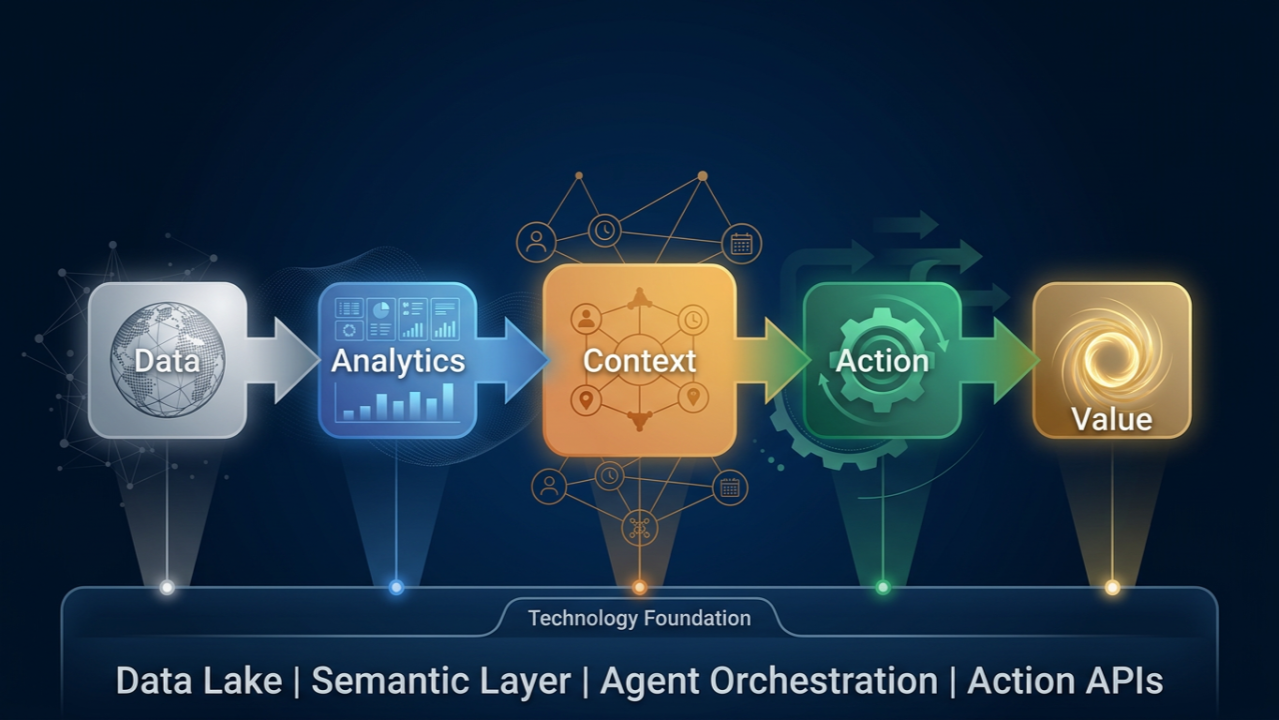
    For me, the sequence is clear:Data -> Analytics -> Context -> Action

    Data and analytics are already in place in many organisations. Action is the goal. The critical layer in between is context.

    Why context makes systems useful

    By context, I mean the information a system needs in order to act correctly. It starts with semantics: shared business meaning, clear definitions, relationships between data, and the logic behind a metric. But it also includes rules, ownership, decision boundaries, current process state, and feedback on the result of an action.

    That is where many transformation efforts become more interesting. The challenge is usually not getting access to data. The challenge is making the business logic explicit enough that a system can support real work reliably.

    I see the same pattern in private work with Claude Code. It becomes much better when it can run tests, inspect logs, see errors and adjust. The model matters, of course. But the real gain comes from context and feedback.

    Without that, agentic AI remains limited. It can answer questions, summarise trends and generate options. But once it has to support action inside a real process, missing context becomes a serious problem. Then you get weak decisions, hallucinations, or systems that are active but business-blind.

    With the right context, the picture changes. Systems can move from showing the business to supporting or executing parts of it in a controlled way. Not replacing human judgement, but extending it where speed, consistency and scale matter.

    Good process design becomes visible

    The moment you try to make a process ready for systems or agents, you quickly see how well it is really understood. Different definitions appear. Modelling gaps become visible. Decision logic that worked informally between people often turns out to be too unclear for reliable execution.

    That is why I think the organisations moving fastest here are not only investing in platforms. They are also investing in semantics, process clarity and feedback loops.

    Where I would start

    I would start with one process where the decision context is reasonably clear and the business value is visible. Describe it end to end: the data, documents, rules, constraints, expected outputs, and the action the system may trigger.

    Then define how feedback comes back into the process. What happened? Did the action work? Where is approval needed? Where is a human still better?

    In my view, the real investment is not the model. It is understanding the process well enough to make action reliable.

    Technology has to evolve in parallel

    At the same time, the technology design cannot wait until the end. It has to evolve in parallel with the process. The software layer must integrate with existing systems, connect to the right context, support agent design and orchestration, and allow testing, control and feedback.

    Why now

    The timing matters as well. SAP is making its landscape more agent-ready with Joule and Business Data Cloud, while Salesforceis moving in a similar direction with Headless 360 and agent-first workflows. If analytics becomes broadly available, analytics alone stops being the differentiator.

    The advantage will go to the companies that connect data, context and process well enough to move from insight to action first.

  • Automating LUKS Encryption Safely with Polkit and Selective sudo

    Automating LUKS Encryption Safely with Polkit and Selective sudo

    📢 Automating LUKS – Seamless Encryption &  The Battle Against sudo

    Fun fact – I used one Chat-Window with ChatGPT to find this solution, at the end I asked him to understand the objective of my questions, and used below prompt to build this post – wouhhh ( I love it how he ignores my spelling mistakes ;.))


    The Problem

    I’ve always been a fan of automation—no unnecessary manual steps, no friction, no surprises.
    When dealing with LUKS-encrypted storage and Samba shares, I had one clear goal:

    ✅ Fully automate mounting and unmounting without needing to enter manual passwords

    Actually, I have another script that gets the password via https request, so its a remote lock/unlock. The script is a simple web-server,  you will know how to do it 🙂

    That sounds simple? It wasn’t.

    The First Idea: Just Use udisksctl

    At first, udisksctl seemed perfect. A simple:

    udisksctl unlock -b /dev/sdf2

    would unlock my LUKS volume, and:

    udisksctl lock -b /dev/disk/by-uuid/XXXX

    should lock it. No root, no sudo.

    But then came the first brick wall: It asked for a password—even when running from a script.
    💬 “Wait, why does udisksctl need root to lock a device, but not to unlock it?”

    Welcome to Polkit & UDisks2—a world of undocumented edge cases.

    Polkit: The Rabbit Hole

    My next move? Polkit rules.
    It should allow passwordless execution, right?

    polkit.addRule(function(action, subject) {
        if ((action.id == "org.freedesktop.udisks2.encrypted-unlock" ||
             action.id == "org.freedesktop.udisks2.lock-device") &&
            subject.isInGroup("disk")) {
            return polkit.Result.YES;
        }
    });

    Result? Still asking for a password.
    Debugging with journalctl -f | grep polkit told me that some actions were still being denied.
    One step forward, two steps back.

    The Real Issue: fuser, Samba & Busy Devices

    Unmounting a LUKS volume is not just about stopping I/O operations—it’s about breaking any remaining connections.

    • Samba still held open files on my mounted LUKS drive.
    • udisksctl lock failed with “Device or resource busy”.
    • umount -l wasn’t enough—because smbd was still running in the background.

    I needed to force kill processes before unmounting.

    sudo smbcontrol smbd close-share LUKSShare
    sudo fuser -km /data/check
    sudo udisksctl unmount -b /dev/mapper/my_luks_drive

    💡 Lesson learned: Locking a LUKS device isn’t just about the disk—it’s about all the services using it.

    The Compromise: Selective sudo

    At this point, I had a choice:

    1. Go even deeper into Polkit and hack my way through more rules.
    2. Accept reality and selectively allow sudo—but in a controlled way.

    I chose option 2.
    Using visudo, I allowed only the required commands to run without a password:

    youruser ALL=(ALL) NOPASSWD: /usr/bin/udisksctl lock -b /dev/disk/by-uuid/*,                              /usr/bin/smbcontrol smbd close-share *,                              /usr/bin/fuser -km /data/check

    This kept security tight while making automation work smoothly.

    The Final Setup

    At the end of this journey, I had a fully working system that:

    • ✅ Mounts LUKS automatically.
    • ✅ Unmounts and locks it without requiring sudo manually.
    • ✅ Closes Samba shares properly to avoid device busy errors.
    • ✅ Uses sudo only for the absolute essentials (but without password prompts).

    Final Changes

    Below are the final changed files:

    • 📂 Mount and Unmount Scripts
      (automating the full LUKS lifecycle)
    • 📂 sudoers File
      (allowing selective passwordless sudo execution)
    • 📂 Polkit Rules
      (the necessary adjustments to make it work)

    🚀 Conclusion

    This wasn’t just about avoiding sudo. It was about understanding Linux security, process management, and automation.
    Would I do it the same way again? Probably.

    Would I recommend it to someone else?
    💡 “Only if you’re really into debugging Linux internals.”

    🚀 Final setup below. Let me know if you see ways to make it even cleaner.

    💡 This post is for those who want real, practical automation without compromising security.
    If you’ve fought the same battle, drop a comment. 🔥

    Mount

     1 #!/bin/bash
     2
     3 # Check if password is provided
     4 if [ -z "$1" ]; then
     5     echo "Usage: $0 <password>"
     6     exit 1
     7 fi
     8
     9 password="$1"
    10 device="/dev/sdx1"   # Your LUKS partition
    12 luks_name="luks-xxx"  # Custom device name
    13
    14 # Unlock LUKS partition with a fixed name
    15 udisksctl unlock --block-device "$device" --key-file <(echo -n "$password")
    16
    17 sleep 1
    18 # Mount the unlocked LUKS volume
    19 udisksctl mount -b "/dev/mapper/$luks_name"

    Unmount

    #!/bin/bash
     2
     3 # Configuration: Set your LUKS device details
     4 LUKS_UUID="luks-xxxx" 
     5 LUKS_MAPPER="/dev/mapper/luks-xxxx"
     6 MOUNT_PATH="//mount_point"  # Mount point
     7 SAMBA_SHARE_NAME="smb_share"  # Samba share name
     8 DEVICE="/dev/sdx1"
     9
    10 # Close active Samba connections
    11 echo "Closing Samba share: $SAMBA_SHARE_NAME..."
    12 sudo smbcontrol smbd close-share "$SAMBA_SHARE_NAME"
    13
    14 sleep 1
    15
    16
    17 # Unmount the LUKS volume
    18 echo "Unmounting LUKS volume..."
    19 sudo udisksctl unmount -b "$LUKS_MAPPER" || umount -l "$LUKS_MAPPER"
    20
    21
    22 # Kill all processes using the mount point
    23 #echo "Killing active processes on $MOUNT_PATH..."
    24 #sudo fuser -km "$MOUNT_PATH"
    25
    26 # Wait for system to release resources
    27 sleep 1
    28
    29 # Lock the LUKS device
    30 echo "Locking LUKS device..."
    31 sudo udisksctl lock -b "$DEVICE"
    32
    33 if [ $? -eq 0 ]; then
    34     echo "LUKS device successfully locked!"
    35     exit 0
    36 else
    37     echo "Failed to lock LUKS device."
    38     exit 1
    39 fi
    40
    41 sleep 1
    42
    43 echo "Set HD to sleep mode"
    44 # sudo hdparm -y "$DEVICE

    Sudo File:

    docbox ALL=(ALL) NOPASSWD: /usr/bin/udisksctl lock -b /dev/sdf2 , \
                                /usr/bin/udisksctl unmount -b /dev/mapper/*, \
                                /usr/bin/smbcontrol smbd close-share *, \
                                /usr/bin/fuser -km *, \
                                /usr/sbin/hdparm -y /dev/sdx1
    

    Polkit Files:

    polkit.addRule(function(action, subject) {
        if ((action.id == "org.freedesktop.udisks2.encrypted-unlock" ||
             action.id == "org.freedesktop.udisks2.filesystem-mount" ||
             action.id == "org.freedesktop.udisks2.filesystem-unmount-others" ||
             action.id == "org.freedesktop.udisks2.unmount" ||
             action.id == "org.freedesktop.udisks2.lock-device" ||
             action.id == "org.freedesktop.udisks2.encrypted-unlock-other-seat") &&
            subject.isInGroup("disk")) {
            return polkit.Result.YES;
        }
    });


  • Driverless Network Printing on Ubuntu with CUPS and IPP

    Driverless Network Printing on Ubuntu with CUPS and IPP

    Just some stuff I learned after a long Sunday on printing:

    Setup:

    • HP107w printer connected via USB to a local server
    • CUPS installed on this server

    Requirements:

    • print from local server, e.g. via echo "This is a test print" | lp
    • print from any desktop PC (windows or Linux from my network)
    • driverless installation -no need to install the HP 107 driver
    • Do not use the Wifi-Part of the printer – dont like to have it enabled

    Solution:

    • Driverless printing: use IPP:Everywhere – that is a protocol where the printer gets pdf or postscript and manages the rest by itself – no need to install a driver
    • Use ipp-usb on the local server to connect the USB printer and make it available via ipp, once installed it looks for usb-printers, that should be visible via lsusb before
    • Find the ipp-url of this printer, this is the URL to reach the printer *locally* , magic command is below, check that (USB) is there
      • sudo lpinfo -v
        network ipp://HP%20Laser%20107w%20(HPF4390959C9CB)%20(USB)._ipp._tcp.local/
    • To make the printer available in the network, you have cups installed on the local server,  the trick to configure cups:
      • create new printer, and select “Internet Printing Protocoll (ipp)
      • image.png
      • on the next page copy the ipp-URL just connected.
    • CUPS moves the printer from the local domain and makes it available on the network.

    Result:

    • Printing from Linux works fine
    • Printing from Windows is still a bit buggy .. following up on this


  • Securing a Home Server with Cloudflare Tunnel

    Securing a Home Server with Cloudflare Tunnel

    A few hours back, I had a straightforward problem: I needed to access my local server securely from the internet without opening it up to unwanted access.

    What triggered this need was my own app Free Your Photos  – that gets you out of the Google Photo Cloud and hosts your photos on a local server – YOU OWN THEM. Now with this solution I can show my photos on any PC – even without a VPN.

    My first instinct was to use a VPN – but this would require a VPN installed on the “browser side”, so I would not be able to access my page from any other computer or phone.

    But – what about accessing my local-server from EVERYWHERE without any VPN setup – but still having security?

    That’s when I stumbled on the idea of using a reverse proxy with multi-factor authentication (MFA). Instead of opening the whole network like a VPN, a reverse proxy could act as a gatekeeper, allowing access only to the server itself and only to authorized users. I set it up to require Google Authenticator, so even if someone got to the login screen, they’d need a time-based code to get through.

    ChatGPT gives a pretty good instructions for all the steps that worked right away for HTTP. But to get HTTPS working I needed some  fine-tuning:

    My configuration: Using Pything with Gunicorn and nginx on Ubuntu.

    What I needed to do special:

    Domain Registration

    • Register a domain on Cloudflare
    • Assure came record is your domain-name and pointing as target to your tunnel, e.g. “345234-1420-4c4e-b8e4-86f8a885ba7a.cfargotunnel.com”
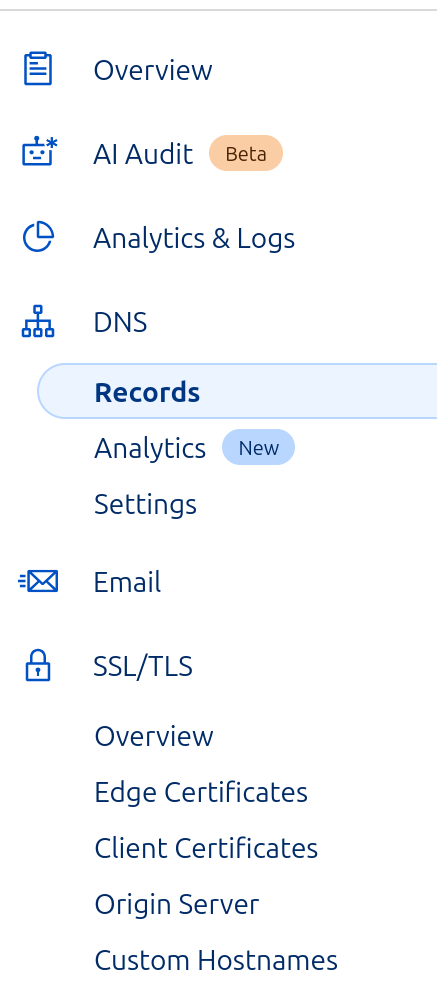
    • Download Origin – Certificates: SSL/TLS->Origin Server – that are used to authenticate the local server against Cloudflare, save them in a folder accessible by nginx web server.

    Tunnel Configuration

    ZeroTrust – Config => Network => Tunnels => Cloudflared

    Type: https, URL: localhost:443
    TSL: NO TLS Verify

    Nginx Config

           listen 443 ssl http2;
           listen [::]:443 ssl http2;
           server_name <your domain name>;
    
            ssl_certificate /etc/ssl/certs/cloudflare_cert.pem;      # Path to your SSL certificate
            ssl_certificate_key /etc/ssl/certs/cloudflare_key.pem;  # Path to your private key
    
            location / {
                include proxy_params;
                proxy_pass http://unix:/home/cneuhaus/FreeYourPhotos/fyp.sock;
            }
        }
    

    Google Authentification

    Access should only be for myself, so I wanted to use Google as authentication provider. For simple steps ChatGPT again is your friend.

    But I only wanted access for myself – otherwise everybody with google account can login, for this:

    Zero Trust=>Settings=>Authentification=>Login Methods, enter App-ID and Client Secret.
    
    Zero Trust=>Application (create new one) =>Policies=>Configure Rules=> add your full Gmail address here
  • Free Your Photos: Exporting Albums into a Self-Hosted Archive

    Free Your Photos: Exporting Albums into a Self-Hosted Archive

    I love taking photos,  its a way for me to keep the memory fresh and to be thankful for the good times in live.

    Since the very beginning I used Picasa to sort my photos.  When Google stopped that service, I moved to Google Photos – since then I have hundreds of albums, that allow me to browse through my life.

    I love all the features, from sharing, organizing, automatic synchronization and much more…. until I tried to download an album and checked for EXIF information on GPS and date and time…. and…. YES:


    LOCKED IN THE CLOUD: As more I tried as more I got frustrated.. until I learned in a forum that this is not a defect, but strategy: You please keep your photos @ Google, so you are stuck with this service, pay money for cloud storage and ..just be with Google forever.

    Yest – that can be fine, unless you start thinking what Google may do with Google Fotos, maybe “say goodbys”, limit the storage, share your data – you just don’t have control.

    That was the reason why this happened:

    Solution Overview

    Source Code: https://github.com/happychriss/FreeYourPhotos

    Problem: Dependency on Google and Cloud Services

    • Long-term use of Picasa and Google Photos for storing and organizing pictures
    • Risk of services closing down (e.g., Picasa)
    • Additional costs for cloud storage
    • Inability to retrieve all information from Google (e.g., geolocation)
    • Google Photo API limitations (cannot access original data and geo-information)

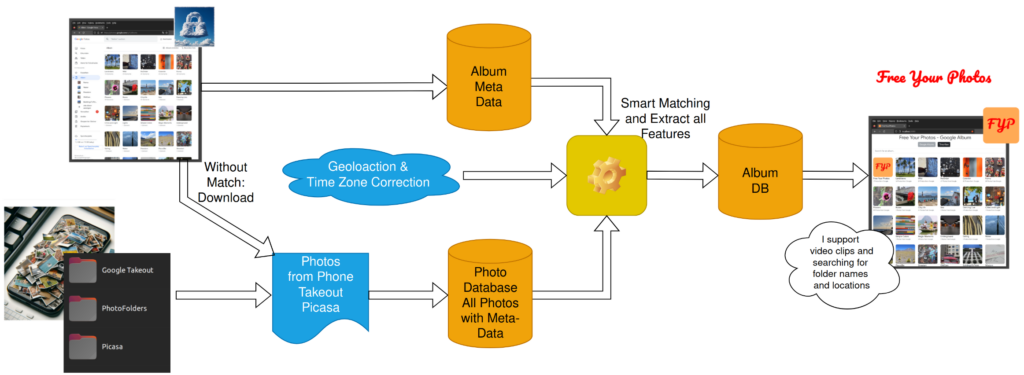
    Solution: Python Scripts and a Web App

    Python Scripts

    • Download album structure and all photos from Google Photos
    • Utilize original data stored on mobile phones, PC folders, or extracted from Google Takeout
    • Retrieve all geo and date information for better ownership of data
    • Integrate photos from your own folder and archives for a consistent look

    Web App

    • Similar functionality to Google Photos,
    • Shows Photos and Videos
    • Photos with Location & Map
    • Search by place and title
    • One tool for all sources, includes Takeout, Picasa (with favorites) and Folders – displaying in Timeline Mode -in right order

    Benefits

    • Independence from Google and cloud services
    • Avoid additional costs for cloud storage
    • Ownership and control over your data
    • Combine multiple photo sources for a consistent experience

    Software Stack & Dependencies

    • Python
    • Flask (Webserver)
    • PostgreSQL
    • Docker
    • Google APIs:
      •  Cloud API to connect to Google Photos (API Key needed) ,
      • Geolocation API to convert geocordinates to location information (search by location)
      • Time API to convert Location to Timezone, to correct time zone (that Google took away)
      • Google MAPs to display location on Photo Detail Page

    Next Steps

    You like it, you want to help. Contact me, via Github or LinkedIn, see About Me


    Latest News

    [display-posts category=”free-your-photos” include_content=”true” image_size=”thumbnail” include_date=”true” date_format=”(d.m.Y)”]

  • ChatGPT and Data Analytics: Early Lessons from Finance Reporting

    ChatGPT and Data Analytics: Early Lessons from Finance Reporting

    How ChatGPT is Changing the Game in Data Analytics!

    This weekend, I had the opportunity to subscribe to “ChatGPT Plus.” I spent some time exploring how AI, like ChatGPT, will change the way we work with our data.

    Currently, I am working on a large enterprise financial transformation project. So – why not starting with a simple order intake to end-up getting the Profit & Loss statement from ChatGPT?

    The results were astonishing, which made me wonder if we should rethink the way we do data and analytics?

    When reading  through my chat with ChatGPT3  – best first to look at the screenshots and than reading my comments. I have described each steps, all  screenshots are all from the same conversation.

    At the end of my summary, I will try to look ahead 1-2 years and determine what kind of decisions we can make based on this understanding.

    A real world scenario from “Selling Bananas” to “Profit and Loss”

    The scenario I want to run is a simple sales process,  to start I am giving ChatGPT the prompt or initial context for our conversation. To let him understand  that we are talking about orders, order-items material and customers.

    But it could be any other scenario or  data structure.

    What does it mean?

    ChatGPT3 is a chatbot that can keep the context of a conversation, this are up to 4000 token (words can be 1-3 token). Once a conversation is longer than this token, he “forgets” the beginning token(FIFO), this is a setting is compromising performance and result quality. For our experiment that is enough.

    Enter Sales Transactions as “Free Text”

    I found blasting – I am providing free text information on some sale scenarios, just indicating what could be transactional or masterdata – and the KI puts this information in the right context and knows which of the free-text information belongs to which object (see next window for more details)

    What does it mean?

    When loading new information into any system –  this requires to understand the business context of the data and also the structure of the data in the DataLake / Database. In this scenario the “world knowledge” of ChatGPT made it understand the business context and the prompt information gave the structural information.

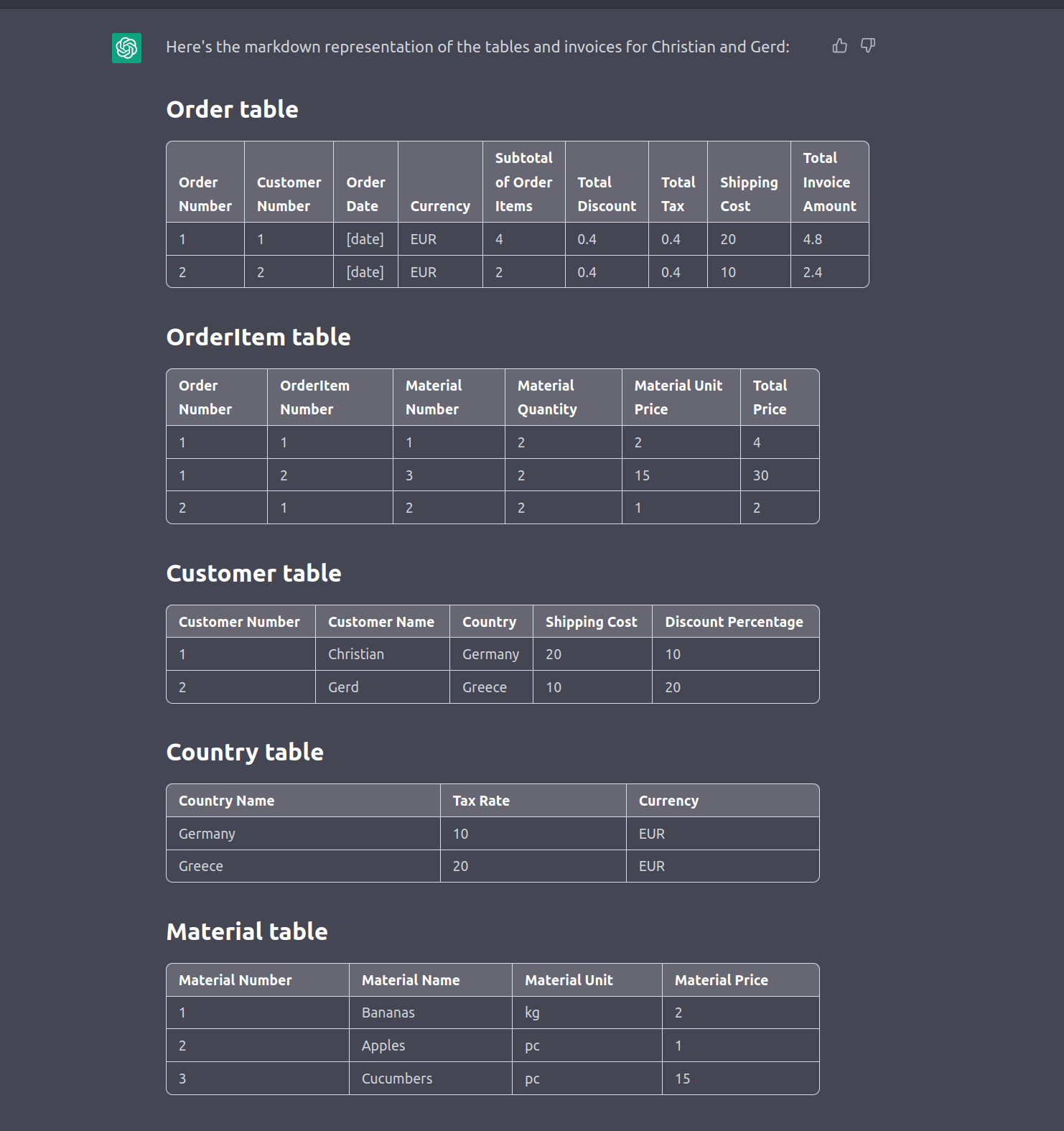
    Show me the tables!

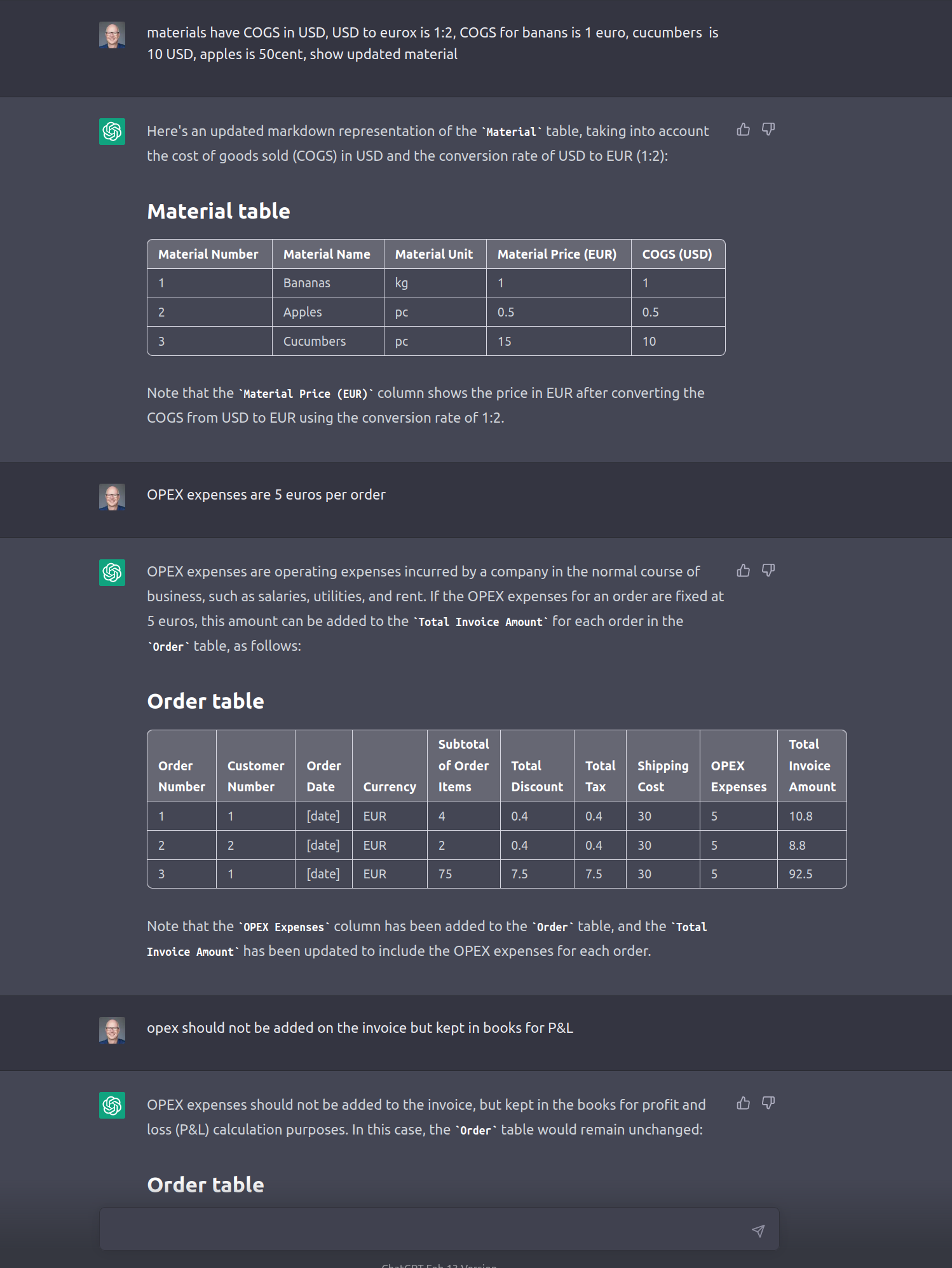
    I asked ChatGPT to present this data in tables – to validate if it had the right understanding – just enjoy how this works.

    Its worth to notice that the concept of master-data is understood and even IDs a matching as needed for a relational database. I believe that happened as in my initial prompt was indicating a relational data structure.

    What this means?

    I tried some more scenarios, like “Christian buys the same again” – and it got right all the time – basically anybody with business context is able to load data into a lake. Considering ChatGP3 speaks multiple languages – its the concept of one interface to the data.

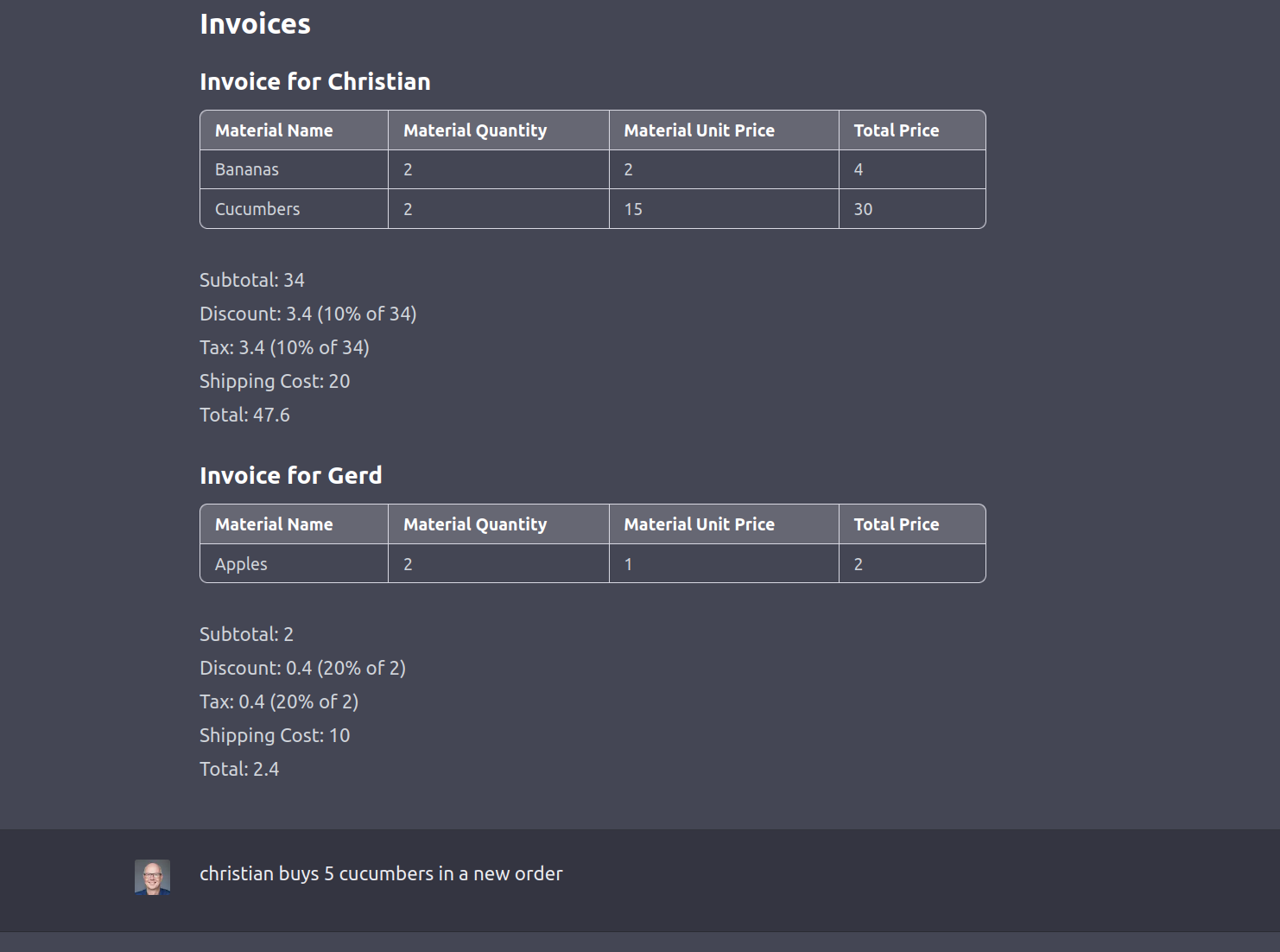
    Print an Invoice

    I asked to generate an invoice based on the information provided – and the results looks nice. In addition (in another chat) I asked to add certain details – and the invoice layout was adjusted.

    What does it mean?

    ChatGPT has “learned” a big part of the internet, it read “all books” and now has an memory that somehow represents the common thinking (in topics with a lot of reference material)

    This common standard was applied to the invoice, so the result is an invoice as -most- people would expect to see. This will not fulfill every bodies need, but a user could refine the layout and the logic in this conversation.

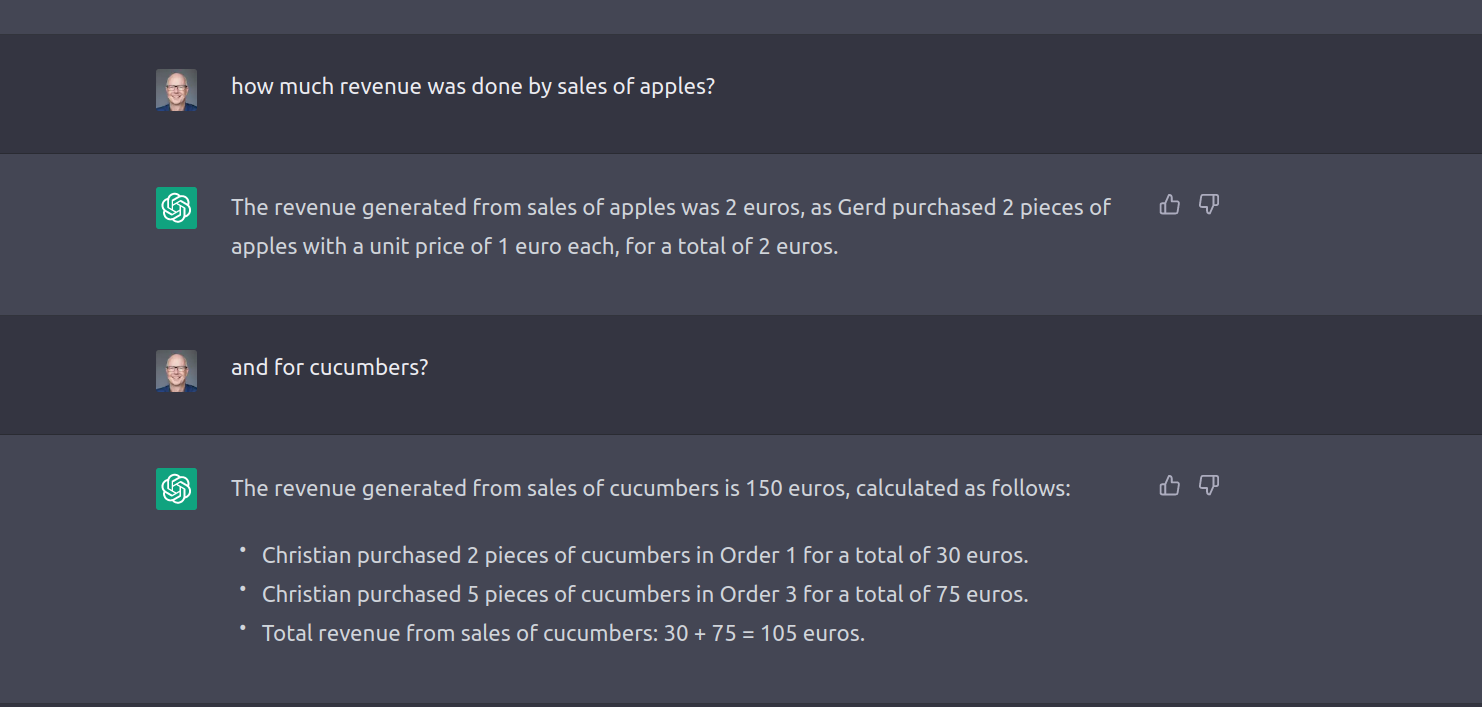
    Run the Analytics

    I was interested on the revenue of my little business – so why not just asking for it.

    I tried other examples, “Revenue of Fruits” – if there would be regions –  you could ask “Revenue in EMEA” or “Total Tax sold on Bananas” – returned answers work out.

    What does it mean?

    As you see – the answer was provided , again “revenue” was not in the original data model – the answer was coming from the conversational context (data structure, sales information ) and the common knowledge.

    You will also notice, that there is explanation in the answer – that makes it better understandable how the results have been calculated. Its possible to ask more details on each step.

    Adding COGS and OPEX

    Moving away from sales to get my “Profit and Loss” – I needed to add COGS and OPEX calculation to my sales – this will require to add new data, but also requires updates in the data structures.

    What does it mean?

    One sentence “OPEX expenses are 5 Euros per order” resulted in 3 steps:

    1. adjusting the table structure
    2. calculating the values based on the formula
    3. updating the existing data

    This is already a small IT project 🙂

    ChatGPT is seeing data structure, content as “one input” –  hence it will try to keep all all above elements consistent and aligned. What is a difficult task in an analytics project comes naturally here.

    (*) Please note that this process does not really make full sense from financial perspective!


    Profit and Loss Statement

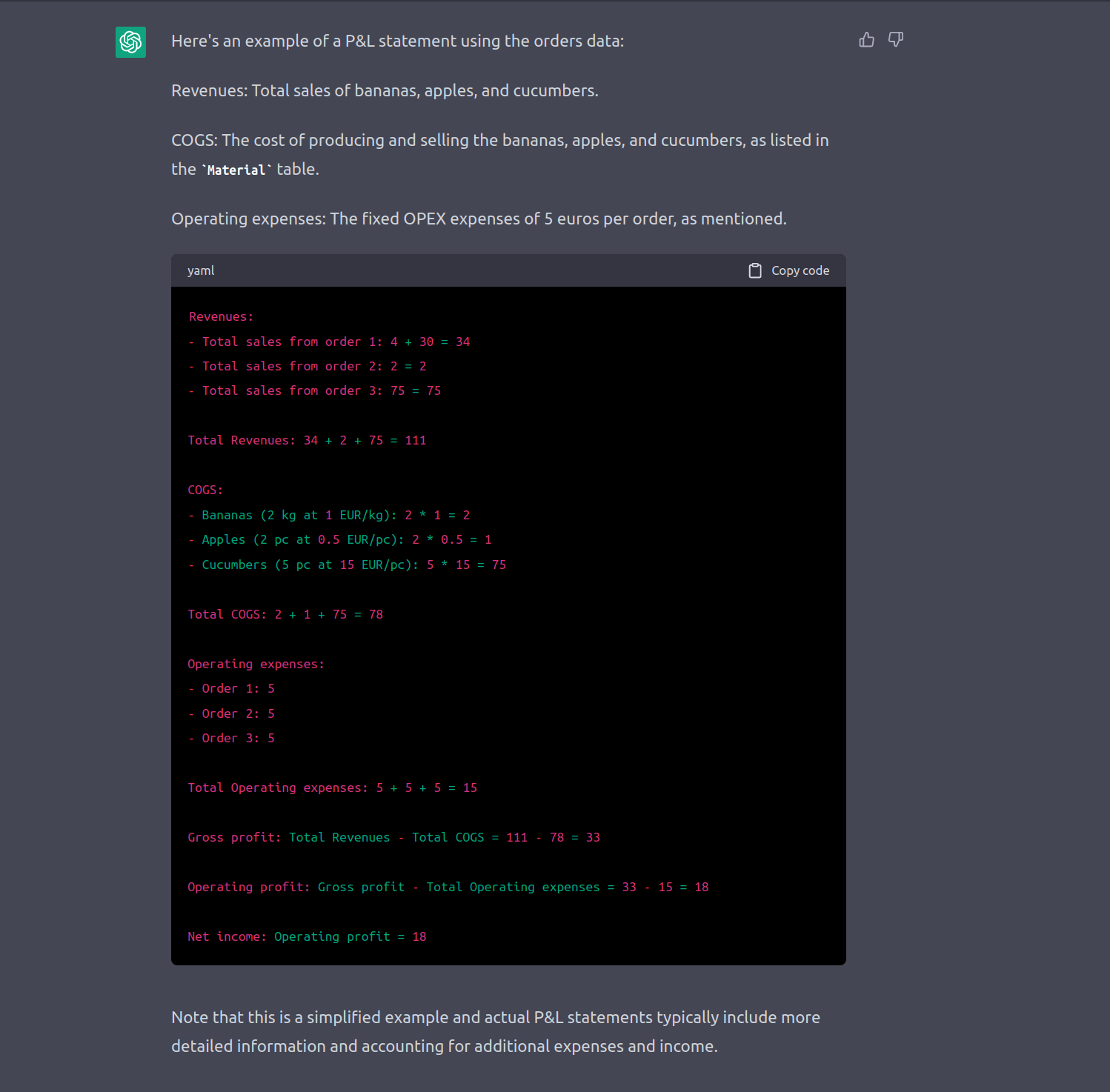
    I asked to get the P&L Statement – and got it.

    I tried without having COGS and OPEX – and ChatGPT complained – that is not enough to build a statement.

    What does it mean?

    Again this is a combination from world – knowledge and conversational knowledge. The interesting part is,that we moved from sales to finance and the data now is in a different context. Use of a database is not driven by its original design, but by the context and questions asked.

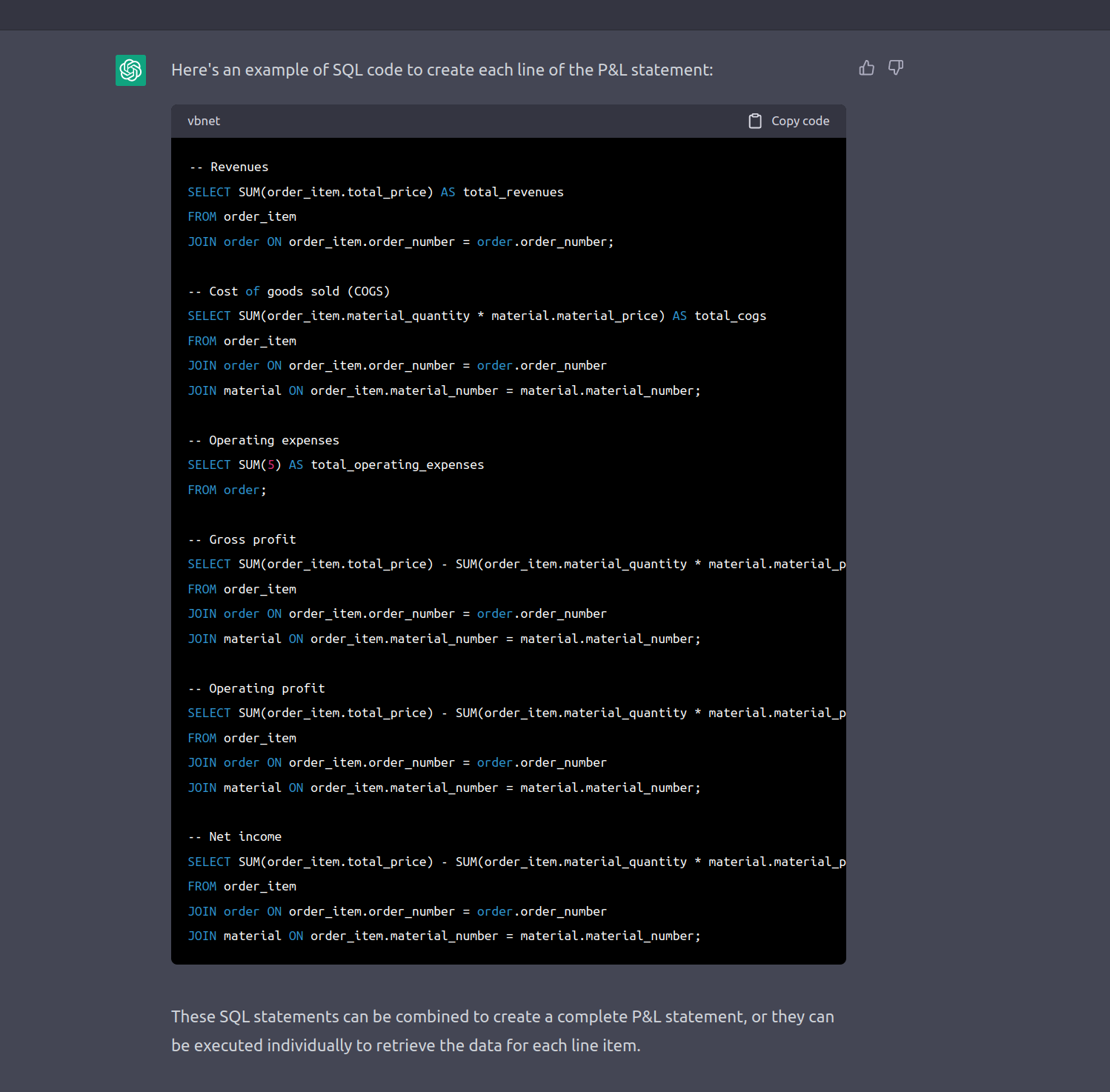
    Build and Application

    Because conversational knowledge is restricted, its a good idea to conserve it in code/sql statements. I must admit I did not check those statements. I did checks for other scenarios and I found the quality pretty good, some joins would have taken me a lot of time to build.

    What does it mean?

    SQL Statements or programs can be generated by ChatGPT and it is really, really good in it. That statements can be seen as the persisted knowledge – I way to get the outcome documented and re-useable. A normal user query can be just executed by ChatGPT, something like an P&L statement should be based on a fixed, approved set of statements. Both ways are possible.

    work of dalle-2

    BIG CHANGE AHEAD

    Revolutionizing Data and Analytics: Envisioning the Future of AI that Combines General and Domain-Specific Capabilities for Unmatched Power”

    Sam Altman, the CEO of OpenAI, envisions a near future where custom-built/individual AI will be common and can have custom characteristics or knowledge.

    I envision a domain specific Data and Analytics AI enriched with common world knowledge, that consists of three components:

    1. Validated common world understanding (common layer)
    2. Validated subject matter expert knowledge (e.g. validated finance rulesets, US GAAP, SEC, Medical Research).  This rulesets could be tailored to a scope (research area) , a process (sales) or an application, like SAP BW or CFIN.
    3. Prompt Knowledge: Understanding of the specific details of a data lake or structure, which provides the overall framework for storing the data and gives direction to build the overall design. Similar to the prompt that has been used in previous examples, the prompt could also be the knowledge of a legacy system that needs to be used.

    Companies will start selling these AI as bundles, combining 1. and 2. and helping the customer with setting up the prompt knowledge.

    AI is already used in analytics, and it is already possible to ask questions in natural language that get translated into a dashboard, but I believe this will be on a different level.

    Different Way of Working

    Working with these platforms will be different, more flexible, and with less cost for changes and updates. It will require distinguishing between repeatable/fixed information still boiled in a fixed structure and a spontaneous query by a user.

    It is not clear how the future will be, but it will not remain the same. Given the current speed of development and the huge impact of AI in Data and Analytics, it will change, with new tools and new ways of using/accessing data.

    When making significant investments in Data and Analytics, this revolution should be kept in mind.

  • ESP32 Boot Optimization with PlatformIO and Menuconfig

    ESP32 Boot Optimization with PlatformIO and Menuconfig

    Speed Up Boot-Time with Menuconfig (ESP32)

    When you read this, you may have been already going a long way … and I am still walking.. so this is just my latest understanding. Feel free to correct and help me to further detail this out – and be ready that not all below is really correct… but at least … I got it working this way.. 🙂

    Why does it take a second to boot?

    Boot-Time becomes critical for any embedded device, when you need wake-up from deep sleep and immediate action.  I needed a short boot time  for the Goodwatch project, to make sure the clock is awake super fast when I want her to show the time in seconds on a “hands move” (watch the video here.).

    On the  Wemos D32 Pro it took approx 1 second to  boot – that is to long for many tasks.

    During this 1 second the processor e.g. runs some selfcheck for ram (PSRAM) and some other stuff.

    So – I was thinking, how can I skip this?

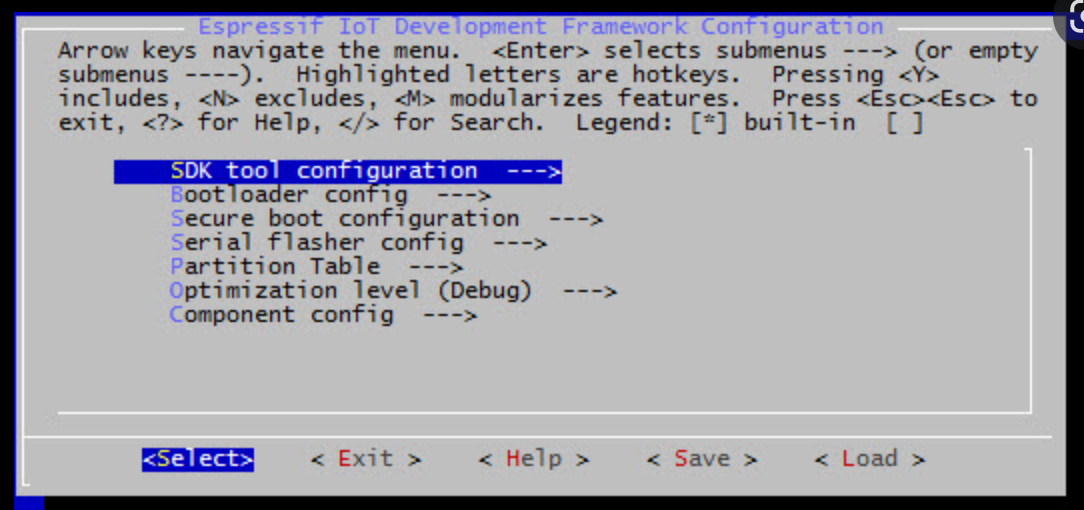
    If you ever looked at your PC BIOS you could see some options there, something similar exists for the ESP32: Menuconfig is a configuration utility provided by Espressif to fine-tune settings for the ESP32 processor family – looking a bit like BIOS settings:

    But with menuconfig you can do much more, so – what I did for Goodwatch

    • Speedup boot as described in : https://esp32.com/viewtopic.php?t=9448
    • Support for external RAM: Y
    • Run memory Test on SPI Init: N
    • Faster SPI: Serial Flasher Config” QIO
    • Double Flash Read Speed: Set CONFIG_ESPTOOLPY_FLASHFREQ to 80 MH from Serial

    As a result, the boot-time reduced dramatically – seconds now are displayed nearly instant 🙂

    But here comes my problem – I did not manage to get menuconfig installed and working together with my Arduino build system and libraries….

    I am using an e-Ink display and quite a few sensors – so it is great to have access to all the Arduino libraries  – just thinking about  ESP-Audio from Schreibfaul that converts the ESP into a radio or voice speaker are  worth using  Arduino, also the great e-Ink library from ZinggJM.

    Understanding the Build System and “Frameworks”

    Setting up that build system is complicated task. To build the Arduino projects I am using Platformio.io – a build and development platform for embedded devices, that supports Arduino but also many other frameworks.

    It helps to understand this terms:

    • Framework: Arduino or espidf: what type of libraries are used to communicate with the hardware. That is the most foundational decision.
    • Platform: That is the core from Platformio – a set of scripts, files that do all the hard work and set-up the build system for you. The platform determines which version of the
    • Components: Code blocks that can be added to the framework to extend the functionality (libraries). Arduino can be used as a component.  Arduino specific Components (libraries wrapping ESP calls into Arduino) are provided by ESP-IDF here. and can be addded here

    The default Platformio configuration is stored the platformio.ini for a simple “Arduiono” project is set-up like this:

    platform = espressif32
    board = lolin_d32_pro
    framework = arduino

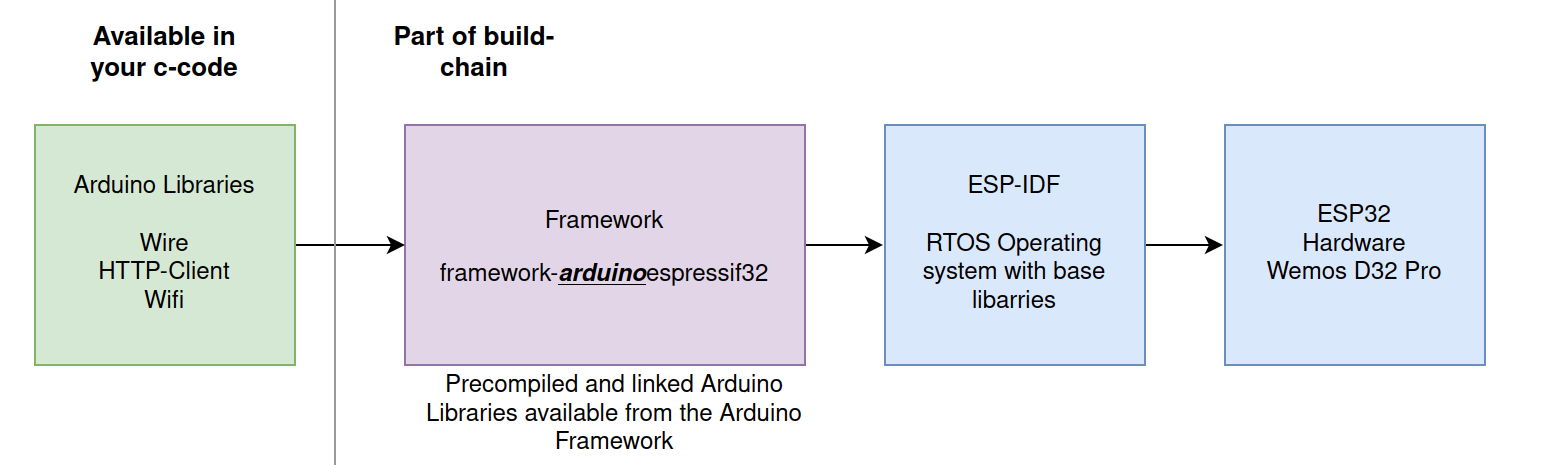
    The arduinoespressif32 Framework does all the work – it allows the device independent Arduino libraries to access the device specific ESP-IDF and ESP32 hardware functions.

    When running the build with Platformio you see the following:

    PLATFORM: Espressif 32 (5.1.1+sha.4901957) > WEMOS LOLIN D32 PRO
    HARDWARE: ESP32 240MHz, 320KB RAM, 16MB Flash
    DEBUG: Current (cmsis-dap) External (cmsis-dap, esp-bridge, esp-prog, iot-bus-jtag, jlink, minimodule, olimex-arm-usb-ocd, olimex-arm-usb-ocd-h, olimex-arm-usb-tiny-h, olimex-jtag-tiny, tumpa)
    PACKAGES: -framework-arduinoespressif32 @ 3.20004.220825 (2.0.4) 

    It using a version 2.04  of arduinoespressif32 , for ease of all the developers this is a “precompiled/bundled” version that does not need the full ESP32 build-chain to be installed.

    That explains, why menuconfig doesn’t work, it is changing the settings in the framework.  This is great to kick-off development (no issues with matching versions) – but there is  no way to change any settings 🙁

    Escape the cave – using ESP Framework with Components

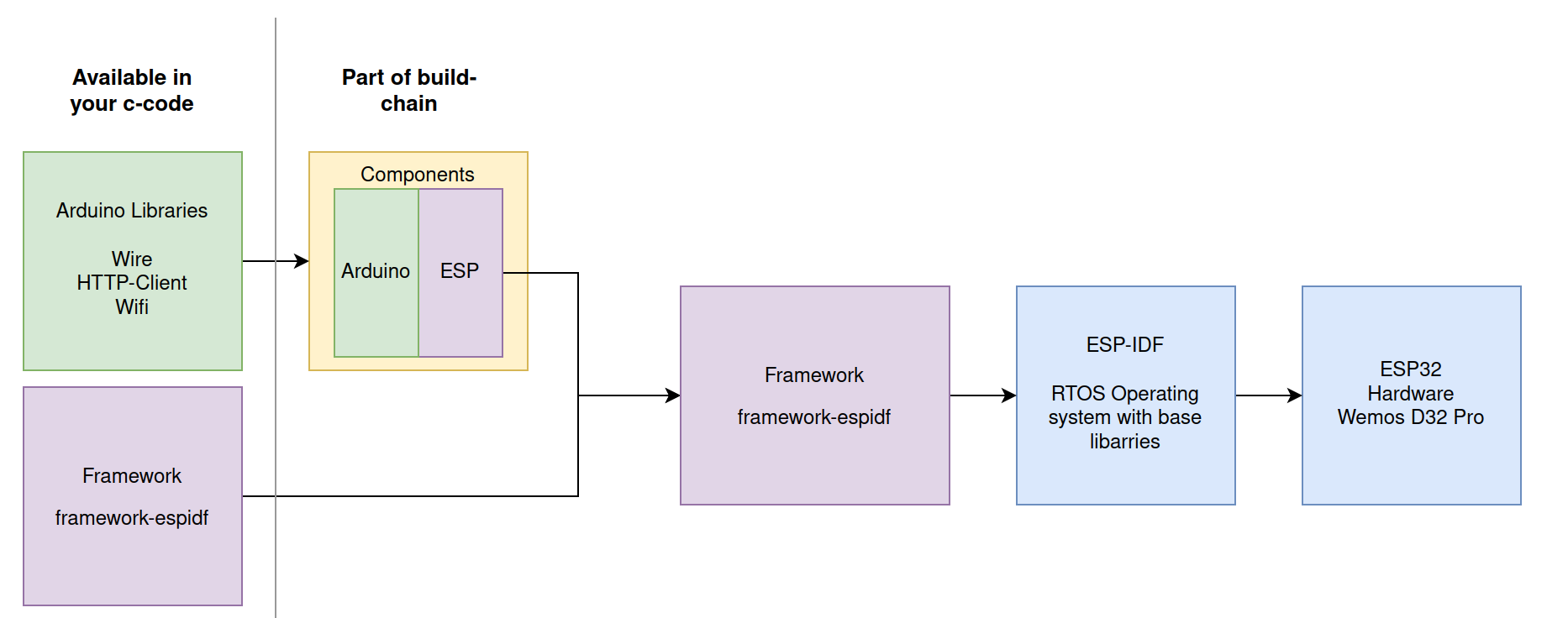
    The only way to get menuconfig working and to have full access to all the ESP32 feature is moving to the Espressif IoT Development Framework. This comes direct from the vendor and allows configuration of the build-chain with menuconfig.

    To keep the best of both worlds, we must still use the Arduino libraries by adding them as Components. How this works is described here. In nutshell the project is not set-up using the Arduino build system and approach, but as the full Espressif chain.

    A folder “components” contains the libraries that map Arduino into ESP32 “language”. All Arduino libraries will keep working, calling the ESP32 functions via the components wrapper  – that call the core esp-functions.

    The challenge – the matching game & magic of Platformio

    But now –  at the end, all must match: Arduino version -> Component -> Espressif Framework… here the nightmare starts…

    Espressif already gives an important information and provides the component at this page.

    The components can be installed from here: https://github.com/espressif/arduino-esp32.git

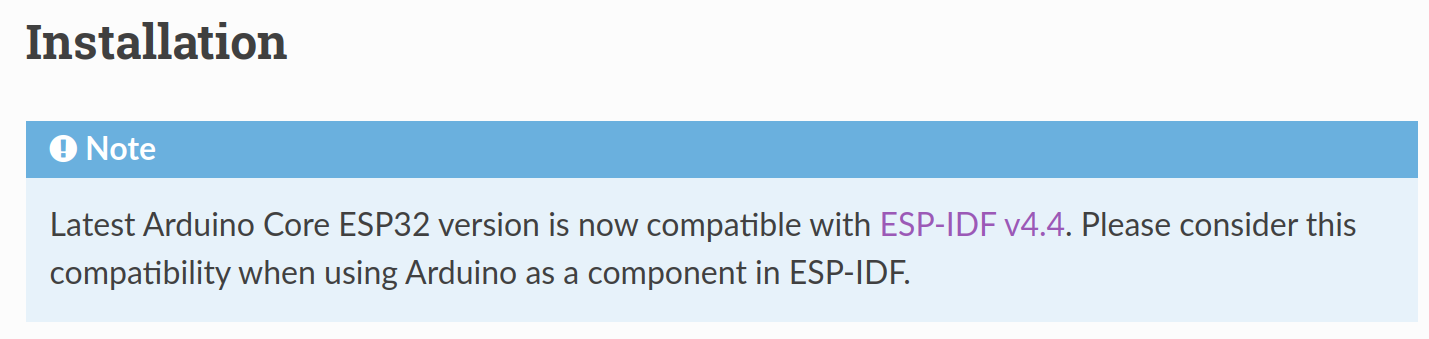
    It also says the work together with ESP-IDF v4.4.

    Now we need to find the matching framework from espidf that supports ESP-IDF v4.4

    First Option – Just try the Standard

    So – lets update platformio.ini with the espidf framework. Should work, we have the components ready

    framework = espidf
    platform = espressif32
    board = lolin_d32_pro

    Result:

    PLATFORM: Espressif 32 (5.1.1+sha.4901957) > WEMOS LOLIN D32 PRO
    HARDWARE: ESP32 240MHz, 320KB RAM, 16MB Flash
    DEBUG: Current (cmsis-dap) External .....
    PACKAGES:  - framework-espidf @ 3.40401.0 (4.4.1) 

    Ups…this didn’t work – its building for the ESP-IDF 4.4.1, and that is not aligned with our components. At the end of the build we get an error message: “undefined reference to `uart_get_tx_buffer_free_size’”

    Second Option – Pick the right platform for IDF v4.4
    framework = espidf
    platform = https://github.com/platformio/platform-espressif32/archive/refs/tags/v4.4.0.zip
    board = lolin_d32_pro

    This looks better, we are now at ESP-IDF 4.4.0

    PLATFORM: Espressif 32 (4.4.0) > WEMOS LOLIN D32 PRO
    HARDWARE: ESP32 240MHz, 320KB RAM, 16MB Flash
    PACKAGES:  - framework-espidf @ 3.40302.0 (4.3.2) 

    Arrgh..but another error-message:

    Arduino-esp32 can be used with ESP-IDF versions between 4.4.0 and 4.4.99,
    but an older version is detected: 4.3.2

    That’s strange, also the platform version indicates using 4.4  –  it seems that the framework selected  remains still on 4.3.2 level  – that is not matching to our components

    Third Option – Using the Tasmota Platform

    Cant remember anymore where I found that tip -but it saved my live. Tasmota is so kind of providing another platform file for Platformio that works. Many thanks to Jason2866 (who maintains this at Github) for all his work – he really makes this possible!!!!!

    framework = espidf
    platform =https://github.com/tasmota/platform-espressif32
    board = lolin_d32_pro

    The result looks better:

    PLATFORM: Espressif 32 (2.0.4) > WEMOS LOLIN D32 PRO
    HARDWARE: ESP32 240MHz, 320KB RAM, 16MB Flash
    PACKAGES:  - framework-espidf @ 3.40403.0 <strong>(4.4.3) </strong>

    The “2.0.4” is the Tasmota versioning of the Platform-File (not the ESP-IDF version).But we see happily a framework with 4.4.3 selected. Hurray!!!!!!

    Honestly I do not understand the full magic in the Tasmota Platform configuration…. lets see what we have

    Deep Dive.. what is different from Tasmota to Platformio platform file

    Each platform file has a json, that defines the elements to be used for the build chain.

    Lets look at this file:

    "version": "2.0.4+1",
      "frameworks": {
        "arduino": {
          "package": "framework-arduinoespressif32",
          "script": "builder/frameworks/arduino.py"
        },
        "espidf": {
          "package": "framework-espidf",
          "script": "builder/frameworks/espidf.py",
          "description": "ESP-IDF is the official development framework for the ESP32 and ESP32-S Series SoCs.",
          "homepage": "https://docs.espressif.com/projects/esp-idf/en/latest/esp32/",
          "title": "Espressif IoT Development Framework"
        }
      },
      "packages": {
        "framework-arduinoespressif32": {
          "type": "framework",
          "optional": true,
          "owner": "tasmota",
          "version": "https://github.com/tasmota/arduino-esp32/releases/download/2.0.4.1/framework-arduinoespressif32.tar.gz"
        },
        "framework-espidf": {
          "type": "framework",
          "optional": true,
          "owner": "tasmota",
          "version": "https://github.com/tasmota/esp-idf/releases/download/v4.4.3/esp-idf-v4.4.3.zip"
        },

    What can we see here?

    • The “version” 2.0.4 seems to be Tasmota specfic and does not indicate the ESP-IDF version
    • The Tasmote package supports two framewors: “Arduino” and “espidf” – we look for espidf
    • The  framework-espidf framework points indead to a specific framework from tasmota with version 4.4.3  -> and that is the trick: Tasmota build its own framewor.
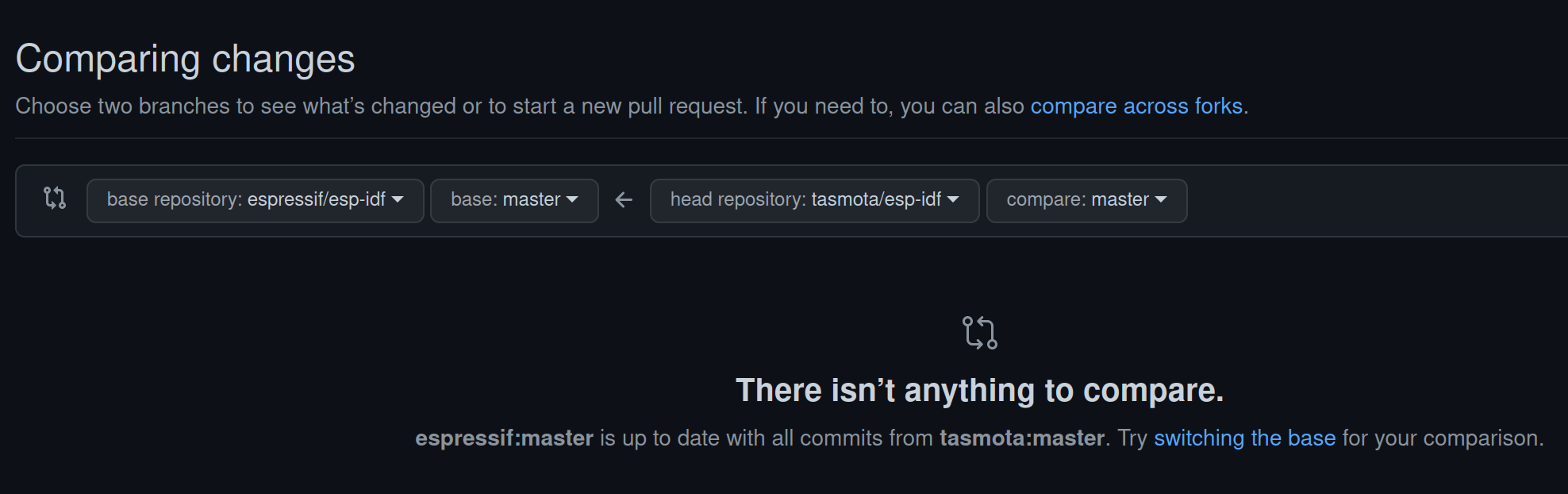
    • Looking at the framework form Tasmota here: https://github.com/tasmota/esp-idf we see its a fork from espressif/esp-idf version 4.4.3.
    • Comparing both forks I see they look the same. So I guess the differences between the Tasmota package and the Platformio Package are minimal, eventually just the version settings in the json.file

    Thats enough for me – now I have an easy config working 🙂

    How to do it – Tips & Tricks

    This is not a tutorial how to set-up the full build environment. So, to get there:

    1. Setup a normal development project with Platformio and following platformio.ini:
      framework = espidf
      platform =https://github.com/tasmota/platform-espressif32
      board = lolin_d32_pro
    2. Add the matching components from espidf to the folder structure as desribed here:https://espressif-docs.readthedocs-hosted.com/projects/arduino-esp32/en/latest/esp-idf_component.html
    3. I am running Platformio in CLION and get not working cmake file genertated after pio init. I use the following “CMakeLists.txt”:
      cmake_minimum_required(VERSION 3.16.0)
      include($ENV{IDF_PATH}/tools/cmake/project.cmake)
      list(APPEND EXTRA_COMPONENT_DIRS arduino)
      project(GoodWatch_espif)
    4. Run platformio build

    Long story … short… but works 🙂